Concepts
Agor introduces a few core primitives that make multiplayer AI development spatial, introspectable, and composable.
🌳 Worktrees
A worktree is where your agentic coding sessions take place. It’s an isolated working directory for a git repository - think of it as a checkout of your repo at a specific branch or commit.
Agor uses git worktrees under the hood (same concept as git worktree command), but manages them for you automatically. When you create a worktree in Agor, it:
- Creates a git worktree in
~/.agor/worktrees/<repo>/<name> - Optionally creates a new branch or checks out an existing one
- Tracks metadata (issue URL, PR URL, notes)
- Associates all sessions within that worktree
A worktree contains a tree of sessions - as you work, you can fork and spawn sessions creating genealogy trees (more on that in the Sessions section below).
Think of a worktree as a unit of work
Best practice: 1 worktree = 1 issue = 1 PR = 1 feature
Worktree "auth-feature" (issue #123, PR #456)
├─ Working directory: ~/.agor/worktrees/myapp/auth-feature
├─ Branch: feature/oauth2-auth
└─ Sessions: All AI sessions working on this feature

Worktree "payment-integration" (issue #124, PR #457)
├─ Working directory: ~/.agor/worktrees/myapp/payment-integration
├─ Branch: feature/stripe-integration
└─ Sessions: All AI sessions working on this feature
Each worktree is completely isolated - changes in one don’t affect the other. This lets you work on multiple features simultaneously without switching branches or stashing changes.
Agor manages the git worktrees for you - no need to run git worktree add manually. Just create a worktree in the UI or CLI, and Agor handles the git operations.
🗺️ Boards
Boards are spatial canvases for organizing worktrees and sessions - like Trello for AI coding work.
Instead of linear lists, boards use a 2D spatial layout where:
- Each worktree appears as a card on the canvas
- You can drag worktrees to arrange them spatially
- Sessions within a worktree appear as a genealogy tree on the card
- Multiple users see the same board in real-time (cursors, movements, updates)
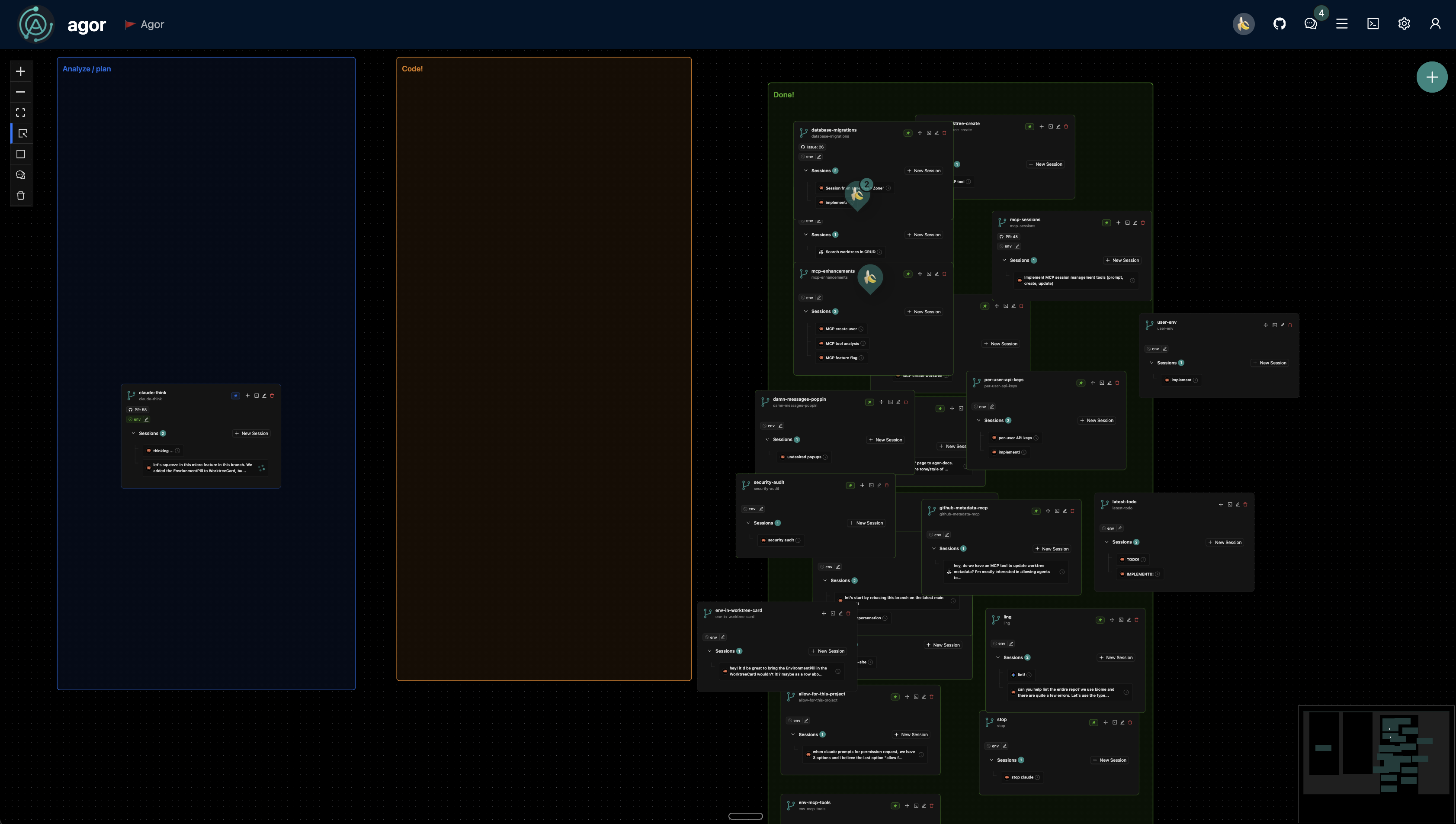
An Agor board showing multiple worktrees organized across three zones (Analyze/plan, Code!, Done!). Each worktree card shows its session tree and metadata.
Why spatial?
Your brain thinks spatially. You remember:
- “The auth worktree is in the top-left corner”
- “Testing sessions are clustered on the right”
- “That failed experiment is way down there”
This is location-based memory - the same reason you remember where you parked, but forget a shopping list. A 2D board gives every worktree and session a “place.”
Multiplayer collaboration
Like Figma revolutionized design collaboration with spatial canvases, Agor does the same for AI coding:
- Everyone sees the same board
- Real-time cursors show where teammates are working
- Drag a worktree, teammates see it move instantly
- No “whose terminal is this?” confusion
🎯 Zones
Zones are spatial regions on your board that trigger templated prompts when you drop a worktree into them.
Think: drag a worktree to “Ready for Review” → auto-prompts for code review. Drag to “Needs Tests” → auto-prompts for test generation.
How zones work
When you drop a worktree into a zone:
-
Session selection - which session gets the prompt?
- Always create new session (default) - clean slate for the zone’s task
- Let me pick - choose which session in the tree has the right context
- Most recently active - usually the session you were just working in
-
Templated prompt executes - the zone’s prompt template renders with dynamic data
Handlebars templates
Zone prompts use Handlebars templates to inject context from:
- Worktree:
{{ worktree.name }},{{ worktree.issue_url }},{{ worktree.pull_request_url }} - Board:
{{ board.name }},{{ board.description }} - Session:
{{ session.title }},{{ session.description }} - Environment:
{{ environment.url }},{{ environment.status }} - Repo:
{{ repo.name }},{{ repo.default_branch }}
Example zone prompt:
Review the implementation of {{ worktree.issue_url }}.

Check if:
1. All acceptance criteria from the issue are met
2. Edge cases are handled
3. Error messages are user-friendly

If approved, comment on {{ worktree.pull_request_url }} with summary.
Drop a worktree → auto-prompts with issue/PR links pre-filled.
Zones = Templated workflow automation for AI sessions. Drag to trigger. Context flows automatically. No manual copy-paste.
👥 Social Features
Agor is great solo, but social features unlock Figma-like collaboration to software engineering.
Just as Figma transformed design from a solo activity into real-time collaboration, Agor brings the same multiplayer magic to AI coding. No more “share your screen” calls or wondering what your teammate’s AI is doing.
Comments & Conversations
Annotate sessions, worktrees, zones, and boards with threaded conversations.
Leave scoped/spatial comments on:
- Board-level - Team discussions about workflow or priorities
- Zones - “All sessions in this zone need API keys configured”
- Worktrees - “Ready for review” or “Blocked on API access”
- Sessions - “This approach didn’t work, try the forked version”
Comments create a persistent conversation layer on top of your AI work:
- Thread replies for focused discussions
- Mention teammates with
@username - Link directly to specific sessions or worktrees in comments
- Comment history preserved with full timestamps
- Organized by scope in the comments panel (Board → Zones → Worktrees)
The insight: AI conversations are ephemeral - Claude says something, you respond, it’s buried in the chat. Comments are spatial and persistent - pin them to the exact artifact (zone, worktree, session) where they matter. Teammates can discover your insights without digging through transcripts.
Live Cursors
See where your teammates are working in real-time. Every user on a board has a cursor that shows:
- Their current position on the canvas
- Their name and avatar
- What they’re hovering over or dragging
Cursors update at 100ms intervals, making collaboration feel fluid and natural. You can see when someone is inspecting a worktree, dragging a session, or exploring a different area of the board.
Why this matters: Location awareness prevents conflicts and enables spontaneous collaboration. See your teammate hovering over a session? Jump in and help. Notice someone dragging a worktree to the same zone? Coordinate in real-time.
Facepile
Know who’s online at a glance. The facepile shows:
- All active users on the current board
- Their avatar and name
- Real-time presence status
It’s the same pattern Figma uses - you always know who’s in the workspace with you. No need to ping Slack asking “are you looking at this?”
💬 Sessions
Sessions are AI conversations that can fork and spawn, creating genealogy trees.
Unlike linear CLI tools where conversations scroll up in a terminal, Agor sessions can branch:
Session: "Build authentication system"
├─ Fork: "Write tests for auth"
├─ Fork: "Build user profile that uses auth"
└─ Spawn: "Research OAuth2 best practices"
   └─ Spawn: "Evaluate PKCE vs implicit flow"
Why this matters
Traditional AI coding tools: Linear conversation. Want to try something different? Start over or lose your context.
Agor: Branch your conversation like git branches code. Every fork/spawn is:
- Introspectable - full conversation history kept
- Composable - fork from forks, spawn from spawns
- Multiplayer-friendly - teammates see the tree, understand the exploration
- Resumable - post-prompt any session in the tree anytime
Fork vs Spawn
Fork creates a sibling session with a COPY of the conversation context at that moment - perfect for parallel work streams that need the same starting knowledge but different focus.
Session: "Built user authentication feature"
├─ Fork: "Write comprehensive unit tests for auth"
├─ Fork: "Build user profile page that uses auth"
└─ Fork: "Generate API documentation"
Each fork starts with the full context of how auth works, then builds its own conversation.
Spawn creates a child session with a FRESH context window - the parent agent packages only the relevant context from the current session based on your spawn prompt.
Parent: "Build complete e-commerce checkout flow"
├─ Spawn: "Implement payment gateway integration"
├─ Spawn: "Build inventory validation service"
└─ Spawn: "Create order confirmation email templates"
Parent orchestrates, children execute focused subsessions with clean context.
Key insight: Both fork and spawn work on the SAME worktree (same filesystem), but create independent conversations going forward. You’re not exploring alternative implementations (they’d conflict on disk!) - you’re doing parallel work that starts from shared knowledge.
💻 Environments
Environments are runtime instances (dev servers, Docker containers, etc.) for your worktrees.
Configuring them is optional—worktrees run fine without it—but adding a template gives you shared start/stop controls, automatic health checks, and collision-free URLs.
Each repo can have an environment configuration template that defines:
- How to start/stop the environment (commands)
- Health check configuration
- App URL template
Looking for step-by-step setup guidance? See the Environment Configuration guide.
Each worktree gets its own environment instance with:
- Unique ports (auto-assigned using worktree unique ID)
- Process status (running, stopped, error)
- Access URLs (resolved from templates)
- Live logs
Example environment config:
up_command: 'UI_PORT={{add 9000 worktree.unique_id}} pnpm dev'
down_command: "pkill -f 'vite.*{{add 9000 worktree.unique_id}}'"
app_url_template: 'http://localhost:{{add 9000 worktree.unique_id}}'
Result:
- Worktree #1 runs on port 9001
- Worktree #2 runs on port 9002
- Worktree #3 runs on port 9003
This lets you run multiple worktrees simultaneously without port conflicts. Start/stop environments directly from the UI or CLI.
🤖 Assistants
An Assistant is a persistent AI companion that lives in your Agor workspace.
While a normal worktree is where code gets written, an Assistant is a who — a long-lived entity with memory, identity, skills, and the ability to orchestrate work across your entire workspace. Assistants maintain file-based memory across sessions, run on heartbeat schedules, and coordinate multi-agent workflows through Agor’s MCP tools.
Inspired by OpenClaw’s agent loop architecture, Agor Assistants adapt the core patterns — markdown-based memory, identity files, scheduled loops — for team-based developer workflows with full visibility on spatial boards.
Learn more: See the full Assistants guide for setup, key concepts (BOOTSTRAP.md, BOARD.md, HEARTBEAT.md, Skills), and real-world examples.
Summary
- Worktrees = Isolated git working directories (1 worktree = 1 issue = 1 PR)
- Boards = Spatial canvases for organizing worktrees with real-time multiplayer collaboration
- Zones = Spatial triggers for templated prompts (Kanban-style workflow automation)
- Sessions = AI conversations that can fork/spawn creating genealogy trees
- Environments = Runtime instances with unique ports for each worktree
- Assistants = Persistent AI companions with memory, orchestration, and scheduled heartbeats
Together, these primitives make Agor a multiplayer, spatial layer for AI coding - connecting Claude Code, Codex, Gemini, and any agentic coding tool into one unified workspace.