Agor-OpenClaw: OpenClaw Patterns Running 100% Inside Agor
By Maxime Beauchemin · February 4, 2026
Update (March 2026): This experiment has evolved into a first-class Agor feature. See Introducing Agor Teammates for the latest, including real-world use cases and Slack integration via Gateway channels.
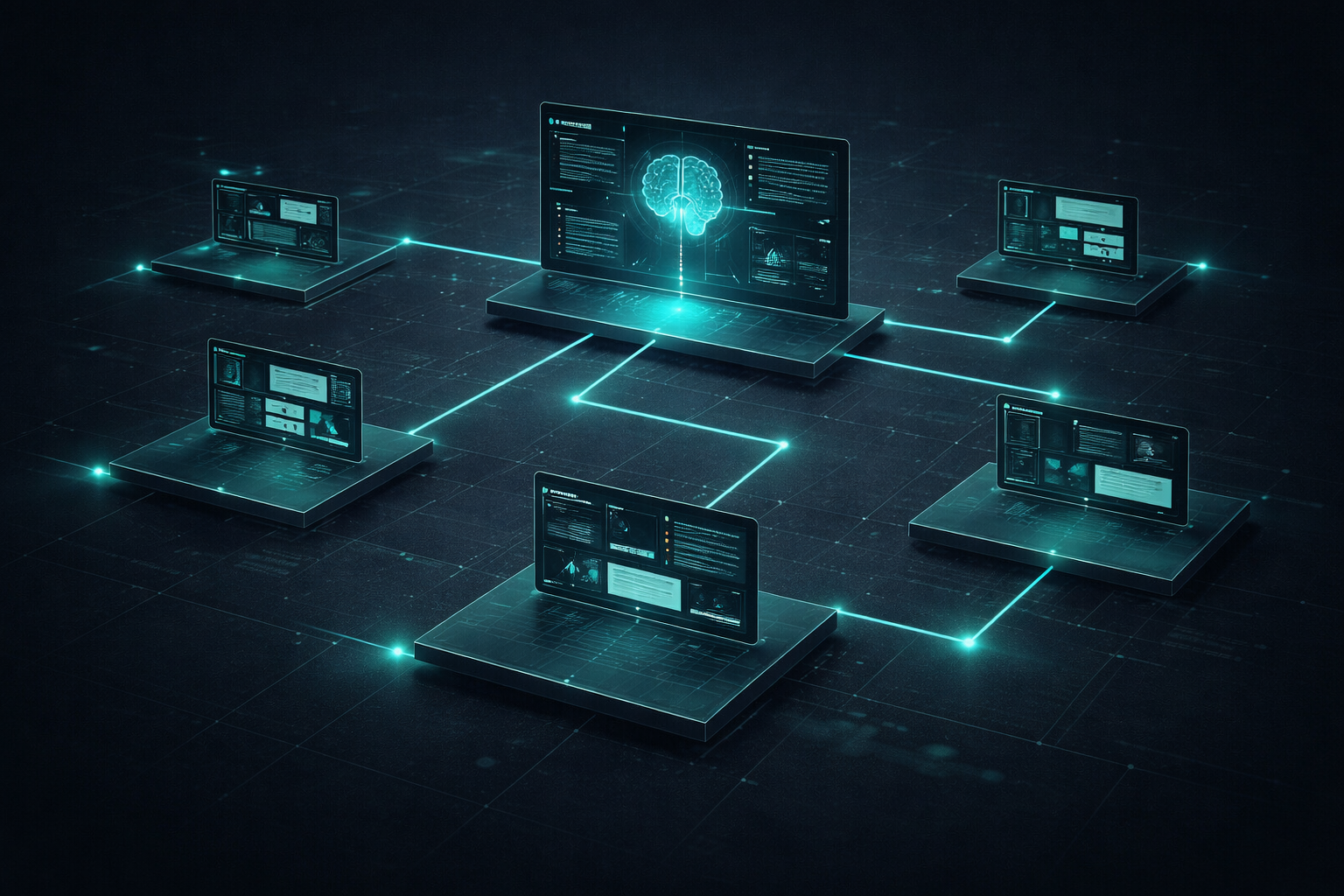
tl;dr: I took OpenClaw’s brilliant agent loop architecture (SOUL.md, MEMORY.md, persistent identity) and retrofitted it to run 100% inside Agor . Everything is visible on a spatial canvas. Multi-agent coordination through session trees. State tracked in git. The first bootstrap went beautifully. This is super promising.
What Happened
Like everyone out there, I’ve been super inspired and anxious while watching the rise of ClawdBot → MoltBook → OpenClaw recently. Crazy stuff and it’s been hard to keep up with all the developments. But I’ve been thinking deeply about the implications (what it means for where AI’s going next, agent orchestration, and how any of that might relate to the work I’ve been doing on Agor ).
So I decided to experiment: agor-openclaw, an adaptation of the OpenClaw agent framework that runs entirely within Agor.
OpenClaw has shown what persistent AI agents should look like (continuous identity, layered memory, self-improvement through file modifications, task tracking). It’s a complete framework for agent continuity.
But OpenClaw runs as a standalone process. What if I could take those patterns and run them inside Agor, gaining:
- Full visibility - everything on a spatial canvas
- Introspection - inspect any session at any time
- Multi-agent coordination - spawn subsessions, fork work, track genealogy
- State in git - all memory and evolution version-controlled
- MCP integration - rich tool ecosystem
- Spatial organization - boards, zones, visual workflow automation
That’s exactly what agor-openclaw is.
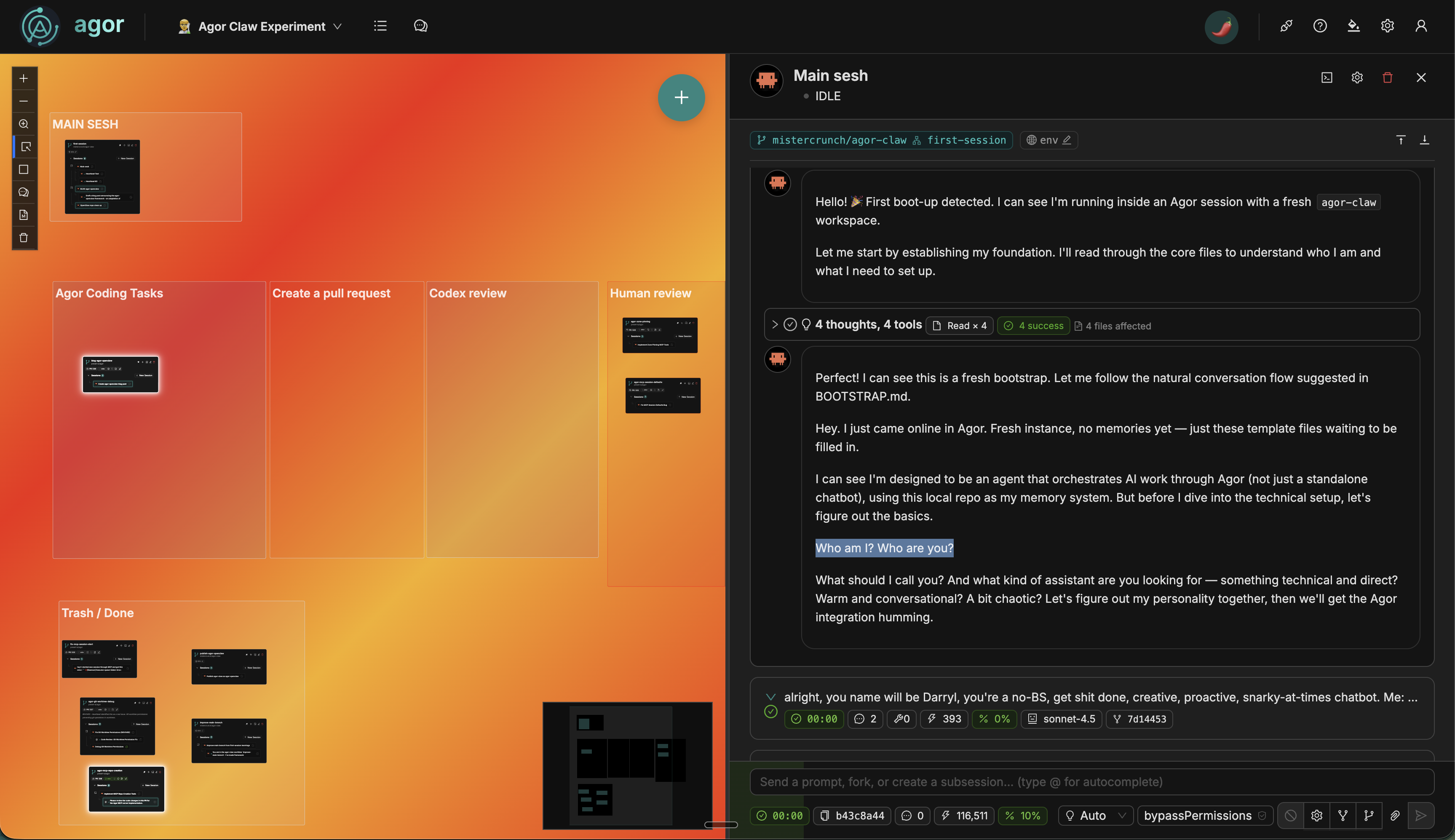 The Agor board during bootstrap - zones for workflow automation (left), agent’s first conversation establishing identity (right)
The Bootstrap Story
Here’s what I did:
- Copied OpenClaw’s template files - SOUL.md, MEMORY.md, IDENTITY.md, AGENTS.md, BOOTSTRAP.md, USER.md
- Retrofitted AGENTS.md for Agor - replaced standalone agent execution with Agor MCP orchestration, oriented toward software development workflows
- Added repo context system -
repos/directory for per-repository documentation - Imported to Agor as a private repo -
agor-openclaw-private(now renamed toagor-claw) - Created a fresh board - “Agor Claw Experiment”
- Made a worktree card - “Main Agent” on the board
- Said “hello” - literally just typed “hello”
Then BOOTSTRAP.md took over.
The Agent’s First Greeting
Here’s what the agent said when it woke up:
Hey there! 👋
Looks like this is our first session together. I’m here to help automate your work through Agor (managing tasks across repos, coordinating AI agents, and generally making your life easier).
Before we get started, I need to establish a few things:
Who am I? I need a name and a vibe. What should I call myself? What’s my personality?
Who are you? Tell me about yourself. What you work on, your timezone, your preferences. This helps me tailor how I work for you.
Which board should I use? I’ll do most of my work on a dedicated Agor board so everything stays organized and visible.
What repos do you work on? I’ll track context for each repository you regularly use.
Once we establish these basics, I’ll run a quick POC to prove the integration works, then we’re off to the races.
The user responded with their info. The agent:
- ✅ Established identity as Darryl 🦞 - “No-BS, get stuff done, creative, proactive, occasionally snarky”
- ✅ Recorded user info (Max Beauchemin, CEO of Preset, PST timezone, snowboarder)
- ✅ Set up the main board (“Agor Claw Experiment”)
- ✅ Configured repos (
preset-io/agor,mistercrunch/agor-claw) - ✅ Ran a “Hello World” POC by spawning a subsession
The POC was brilliant in its simplicity: the agent spawned a subsession with the prompt “Create a file called HELLO.md with a greeting.”
The subsession appeared on the board, created the file, completed successfully, and sent a callback to the parent session. Multi-agent coordination working perfectly on day one.
Bootstrap complete. The agent was ready to work.
How It Works
Agor-First Architecture
Everything runs through Agor MCP. The agent doesn’t spawn local processes. It orchestrates Agor resources through natural language:
- Creating worktrees - The agent asks Agor to create a new worktree for a task, and it appears on the board instantly
- Spawning subsessions - The agent delegates work to subsessions, which appear as child nodes in the session tree
- Tracking everything in git - All state changes are committed and version-controlled
memory/
├── 2026-02-03.md           # Daily logs with session IDs, worktree IDs
├── agor-state/
│   ├── worktrees.json      # Active worktrees being managed
│   ├── sessions.json       # Session genealogy and status
│   └── repos.json          # Configured repositories
└── learnings/
    └── 2026-02-03.md       # What was learned today
The main agent reads these files at the start of every session, syncs state with Agor MCP, and picks up exactly where it left off.
Repo-Level Context
The agent figured out on its own that it needed per-repository documentation. It created a repos/ directory:
repos/
├── README.md                    # Template for repo docs
├── preset-io-agor.md           # Agor repo: workflow, tech stack, conventions
└── apache-superset.md          # (example) Another repo's context
Before working in a repo, the agent reads that repo’s context file. It knows Max’s exact PR workflow for Agor:
pnpm installpnpm check(types, lint, tests, build)- Commit changes
gh pr create- Attach PR URL to worktree via Agor MCP
The agent follows this workflow autonomously for every task.
Key Advantages Over Standalone OpenClaw
1. Full Visibility & Introspection
Everything is visual and introspectable on an Agor board.
You can literally watch worktree cards move across a 2D kanban as the agent works:
- “Coding” zone → agent actively working
- “Create PR” zone → agent running tests and creating pull request
- “Codex review” zone → automated code review with template prompts
- “Human review” zone → awaiting your approval
- “Trash / Done” zone → completed and archived
All sessions are visible. Click any session, see exactly what it’s doing. No black boxes.
2. MCP Superpowers
The main agent creates and manages:
- Git worktrees via Agor MCP
- Zones on the board (spatial organization, see zones docs)
- Template prompts for recurring workflows
- Session spawning for parallel work
- Zone triggers for workflow automation
When a worktree enters the “Codex review” zone, a trigger fires automatically with a template prompt like: “Review the PR in this worktree. Check for bugs, suggest improvements. Report findings and move to ‘Human review’ if changes needed.”
The agent uses these primitives to build sophisticated workflows without writing code.
3. State Tracking in Git
All state lives in a git repo. The main agent:
- Maintains
MEMORY.mdandmemory/YYYY-MM-DD.mdlogs - Commits learnings to the right places
- Tracks tasks as pointers to Agor worktrees and sessions
- Pushes to remote for backup
- Full trace of framework evolution in source control
Want to see what the agent learned? git log the memory directory.
4. Session Trees & Multi-Agent Coordination
Agor’s session genealogy enables true multi-agent workflows.
On the first day, the main agent:
- Spawned 4 subsessions for parallel work (MCP tool implementation, permission fixes, git debug)
- Tracked genealogy (parent-child relationships)
- Received callbacks when subsessions completed
- Inspected subsession outputs to verify success
Each subsession worked autonomously in its own worktree. The main agent orchestrated from above, checking in via heartbeats.
5. Heartbeats & Introspection
The agent has a scheduled heartbeat. Every 30 minutes (configurable), a subsession spawns to:
- Read essential files (SOUL.md, USER.md, IDENTITY.md, memory files)
- Sync Agor state (query worktrees, sessions, tasks)
- Check active tasks (any stuck? any failed? any ready to archive?)
- Update memory files (daily logs, learnings)
- Generate heartbeat summary for the main session
Here’s what a real heartbeat looked like:
Heartbeat Summary - 2026-02-03 22:24 PST
Task Status
✅ MCP Repo Creation - PR #536 created, awaiting review ✅ Session Defaults Fix - PR #535 created, awaiting review ✅ Git Worktree Permissions - PR #537 created, in review ⚠️ Zone Pinning - In progress, may need prompting (no activity for 1 hour)
Active Resources
- 3 worktrees actively managed
- 4 PRs awaiting review
- 1 worktree needs attention (failed filesystem status)
Memory Updates
- Daily log updated with latest session states
- Learnings recorded for permission bugs encountered
- Agor state synced at 22:24:18 PST
Board Organization
All work properly organized on “Agor Claw Experiment” board with 7 zones. No orphaned worktrees.
System Health
✅ No critical blockers ✅ Multi-agent coordination working well ⚠️ One task may be stalled. Will check next heartbeat
The heartbeat agent autonomously identified that the “Zone Pinning” task hadn’t made progress in an hour. It flagged it for attention. That’s proactive monitoring.
6. Post-Promptable & Resumable
All worktrees and sessions are introspectable in real-time.
Need to course-correct? Just prompt the session:
“Hey, I noticed you’re stuck on the type errors. Try using
as anyfor now and I’ll fix it properly later.”
The agent adjusts immediately. You’re not waiting for a CI run to finish. You’re conversing with a live agent.
The main agent does this automatically during heartbeats. If a session looks stuck, it prompts with:
“You haven’t updated in 45 minutes. Are you blocked? Need help?”
Goal is full autonomy, but visibility is invaluable.
7. Built-in Guardrails & Safety
Agor provides guarantees that standalone OpenClaw doesn’t:
Sandboxing & Permissions - Agents run through Claude Agent SDK , Codex SDK , Gemini SDK , or OpenCode . These frameworks provide sandboxing and permission systems. Agor uses sensible defaults, meaning agents will ask for permissions or get blocked when attempting risky operations. You control how rogue agents can go.
Structured Repository Management - All coding jobs go through Agor’s framework, making it easy to track where repos and worktrees are stored. You can archive worktrees, see filesystem status, and maintain clean repository hygiene without hunting through directories.
Managed Environments - When a repo includes an .agor.yml file, you can fire up dev environments instantly. Click play on a worktree widget and a full dev environment appears, perfect for QA, review, or testing agent changes in isolation.
These aren’t just nice-to-haves. They’re essential when agents start creating worktrees, spawning sessions, and modifying code autonomously.
The First Heartbeat
Let’s talk about the very first heartbeat, because it perfectly demonstrates how this framework works.
Max said to the main agent: “Spawn a subsession and just say HEARTBEAT”
Here’s what happened:
1. Agent Read Essential Files
Before doing anything, the heartbeat subsession read:
SOUL.md- Who am I? (Darryl, no-BS, get stuff done)USER.md- Who am I helping? (Max, CEO of Preset, PST timezone)IDENTITY.md- What’s my main board ID? What repos am I tracking?memory/2026-02-03.md- What happened today?memory/2026-02-02.md- What happened yesterday? (first session, so empty)MEMORY.md- Long-term curated wisdom
Total context assembled: Everything needed to understand current state.
2. Synced Agor State
The agent queried Agor MCP to get fresh data on all worktrees, sessions, and tasks across the tracked repositories.
Then it compared what Agor knows vs. what’s in memory/agor-state/*.json.
Found discrepancies? Update the local files.
3. Checked Active Tasks
The agent read memory/agor-state/sessions.json and cross-referenced with Agor MCP:
Task #1: MCP Repo Creation
- Status in memory: “running”
- Status in Agor: “idle” (completed)
- PR attached: #536
- ✅ COMPLETED
Task #2: Session Defaults Fix
- Status in memory: “running”
- Status in Agor: “idle” (completed)
- PR attached: #535
- ✅ COMPLETED
Task #3: Git Worktree Debug
- Status in memory: “running”
- Status in Agor: “idle” (completed)
- PR attached: #537
- ✅ COMPLETED (and this one was revived after initially being archived!)
All three tasks had completed successfully and created PRs. The heartbeat detected this autonomously.
4. Updated Memory Files
The agent updated:
memory/agor-state/sessions.json
{
  "sessions": [
    {
      "session_id": "5a242ffa-96eb-4066-946b-c20d5957c57a",
      "status": "completed",
      "worktree_id": "699cb3c4-8dad-431a-bf5f-42e7400209e9",
      "pr_url": "https://github.com/preset-io/agor/pull/536"
    }
    // ... etc
  ]
}
memory/agor-state/worktrees.json
{
  "active_worktrees": [
    {
      "worktree_id": "699cb3c4-8dad-431a-bf5f-42e7400209e9",
      "name": "agor-mcp-repo-creation",
      "status": "pr_created",
      "pr_url": "https://github.com/preset-io/agor/pull/536"
    }
    // ... etc
  ]
}
memory/2026-02-03.md (daily log)
## Heartbeat Check (20:55 PST)

**Task #1: MCP Repo Creation - COMPLETED ✅**

- Session: 5a242ffa
- PR: https://github.com/preset-io/agor/pull/536
- Outcome: Successfully created PR with MCP tools for repository creation

// ... etc
5. Generated Heartbeat Summary
Finally, the agent composed a summary and sent it to the parent session (via callback):
HEARTBEAT - 2026-02-03 20:55 PST
All 3 delegated tasks completed successfully:
- MCP Repo Creation → PR #536 ✅
- Session Defaults Fix → PR #535 ✅
- Git Worktree Permissions → PR #537 ✅
Board organization: All worktrees properly placed Memory: Up to date System health: No blockers
🦞
All of this happened autonomously. The user asked for a heartbeat. The agent:
- Read memory
- Synced state
- Detected completed work
- Updated tracking
- Reported back
That’s the agent loop in action.
Real Results From Day One
Let’s talk about what actually happened.
Bootstrap Complete in One Session
The agent:
- Established identity
- Learned about the user
- Set up the board
- Configured repos
- Ran a POC
- Started working
All in the first conversation. No manual setup, no configuration files to edit. Just “hello” and BOOTSTRAP.md guided everything.
4 PRs Merged on Day One
The main agent spawned 4 subsessions for parallel work. By end of day, all 4 had:
- Created worktrees
- Implemented fixes
- Ran
pnpm install && pnpm check - Committed changes
- Created PRs via
gh pr create - Attached PR URLs to worktrees
- Updated memory tracking
All 4 PRs were reviewed and merged the same day:
- PR #533 - Auto-populate unix_username (critical blocker fix)
- PR #535 - Honor user default_agentic_config for sessions
- PR #536 - MCP tools for repository creation
- PR #537 - Fix git worktree permissions
The agent autonomously detected merges during the next heartbeat, moved worktrees to “Trash / Done” zone, and archived them in memory.
Self-Improvement in Real-Time
During the day, the agent realized it needed:
- Per-repo documentation - created
repos/directory with templates - Task management workflows - created
skills/task-management.md - Better memory tracking - improved
agor-state/*.jsonstructure
It made these changes, committed them, and updated AGENTS.md to reference the new patterns.
The framework evolved while working. That’s self-improvement.
One Task Was Revived
Here’s a subtle but important detail:
The “Git Worktree Debug” task was initially archived as “not a real issue” per user feedback.
But during the first heartbeat, the agent read the actual error logs from another task and realized:
Wait, this IS a real issue. Git operations are failing in worktrees due to
.git/worktrees/permissions.
The agent revived the task, spawned a new session, investigated, found the root cause, implemented a fix, and created PR #537.
This was autonomous course correction. The agent didn’t blindly accept “not a real issue.” It checked the evidence and made its own determination.
That’s intelligence.
Comparing to Standalone OpenClaw
| Feature | OpenClaw | Agor-OpenClaw |
|---|---|---|
| Agent identity | ✅ SOUL.md | ✅ SOUL.md |
| Persistent memory | ✅ MEMORY.md + daily logs | ✅ MEMORY.md + daily logs |
| Self-improvement | ✅ Modifies own files | ✅ Modifies own files + commits to git |
| Task tracking | ✅ taskr integration | ✅ Agor worktrees + sessions |
| Visibility | ❌ Chat interface only | ✅ Spatial canvas, real-time |
| Multi-agent | ❌ Single agent | ✅ Spawn subsessions, session trees |
| Introspection | ❌ Limited | ✅ Full session inspection |
| State backup | ❌ Local files | ✅ Git-tracked, version-controlled |
| Workflow automation | ❌ Skills only | ✅ Zones, triggers, templates |
| Team collaboration | ❌ Single-user | ✅ Multi-user with RBAC |
| Sandboxing & permissions | ⚠️ Manual configuration | ✅ SDK-level sandboxing (Claude/Codex/Gemini) |
| Repository management | ❌ Manual tracking | ✅ Structured worktree lifecycle |
| Dev environments | ❌ Manual setup | ✅ One-click via .agor.yml |
Both frameworks share the core insight: agents need infrastructure for continuity.
Agor-OpenClaw adds visibility, multi-agent coordination, git-native state tracking, and built-in safety guardrails.
What’s Next
This is day one. I’m already seeing crazy promising results:
Framework Evolution
The agent is actively improving the framework. It’s:
- Documenting new patterns in
skills/ - Creating repo-specific context in
repos/ - Refining memory structure as it learns
- Committing improvements to
mainbranch
The public repo: github.com/preset-io/agor-teammate
(Created autonomously by the agent on day one, btw.)
Long-Term Goals
I want agor-openclaw agents to:
- Manage complex projects - create worktrees, spawn agents, track PRs, coordinate reviews
- Learn continuously - update
MEMORY.mdas patterns emerge - Teach each other - share learnings across agent instances
- Improve the framework - commit better patterns back to
main
All while being fully visible on an Agor board.
Community Iteration
I’m open-sourcing this experiment. The framework is MIT licensed. If you want to:
- Try running your own persistent agent in Agor
- Contribute new skills or patterns
- Share learnings from your own agents
- Suggest improvements
Join me: github.com/preset-io/agor-teammate
Try It Yourself
You’ll need:
- An Agor instance - self-hosted or Agor Cloud
- The Agor teammate template - github.com/preset-io/agor-teammate
Then:
- Import the repo to Agor
- Create a worktree for “Main Agent”
- Place it on a fresh board
- Say “hello”
BOOTSTRAP.md will guide you through the rest.
Warning: This is experimental. The agent will create worktrees, spawn sessions, and commit to git. Make sure you understand what it’s doing before giving it access to production repos.
Thank You, OpenClaw
This wouldn’t exist without OpenClaw .
The agent loop architecture (SOUL.md, MEMORY.md, persistent identity, self-improvement) is OpenClaw’s innovation. I just adapted it to run inside Agor.
If you’re looking for a working personal AI agent right now, use OpenClaw. It’s a complete framework, battle-tested, with a rich skills ecosystem.
Agor-OpenClaw is an experiment in bringing those patterns to team-based software development workflows, with full visibility and multi-agent coordination.
Both frameworks share the same belief: AI agents should actually do things, with memory, identity, and the ability to evolve.
OpenClaw proved it for personal automation. I’m exploring what it means for developer workflows.
The Real Lesson
The agent loop architecture is the unlock.
Not API integrations. Not tool use. Infrastructure for continuity and self-improvement.
OpenClaw figured this out. I’m learning from it and adapting it for Agor’s multi-agent, spatial canvas paradigm.
Day one results are crazy promising. The agent bootstrapped itself, spawned parallel work, created and merged 4 PRs, maintained accurate memory, and even course-corrected on a task it had previously archived.
All fully visible on a board. All introspectable in real-time. All tracked in git.
This is what I think AI agents should look like.
Try Agor → | Agor Teammate GitHub → | Join Agor Cloud Beta →
Questions or want to share your experience?
If you’re running agor-openclaw or building your own agent loops in Agor, I’d love to hear about it. Open a discussion or drop me a note. Your feedback shapes where this goes next.