Artifacts
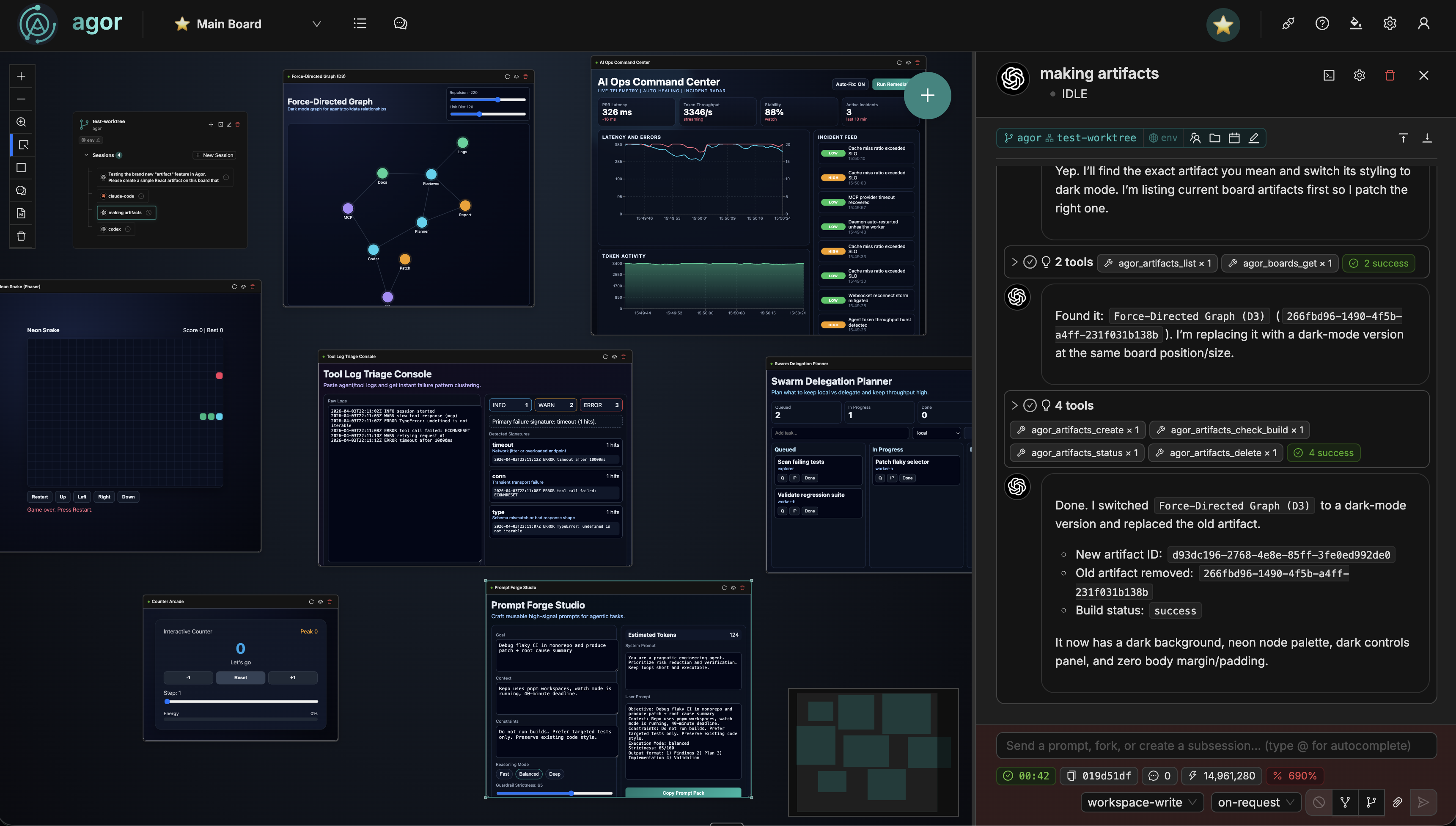
Artifacts are live, interactive applications that agents create and render directly on the board canvas. An agent scaffolds a small app via MCP, writes code into it, and you see it running. No deploy, no preview URL, no context switching.
Under the hood, artifacts are powered by Sandpack , the open-source in-browser bundler by CodeSandbox . A directory of source files inside the branch gets compiled and rendered live in the browser, with no server-side build step needed. The agent writes code, the board shows the result.
How it works
- Agent writes a folder of ordinary source files (a regular
package.json,App.tsx, etc.), typically inside the branch so the code is version-controlled. - Agent calls
agor_artifacts_publishwith the folder path, the board, the Sandpack template, and (optionally) declarative metadata:requiredEnvVars,agorGrants,sandpackConfig. The daemon serializes the file map into the database. - The artifact appears on the board as an interactive node with a live Sandpack preview.
- Agent edits files and republishes with the same
artifactId. The board hot-reloads via WebSocket. - You interact with the running app directly on the canvas: click buttons, fill forms, see state updates.
Artifact anatomy
Each artifact is a stored file map plus a small set of declarative metadata columns. The folder on disk is just the staging area an agent writes before calling publish. No Agor-specific sidecars required.
File map (shipped to the browser):
/package.json          # Standard package.json — dependencies live here
/App.tsx               # Source files (varies by template)
/styles.css
/.env                  # Synthesized at view time; never persisted (see below)
Stored metadata (DB columns; not in the file map):
template: Sandpack template (react,react-ts,vue3, …).sandpack_config: Author-controlled SandpackProvider props (template, customSetup, options). Sanitized on write.required_env_vars: Names of env vars the artifact needs (e.g.["OPENAI_KEY"]). The daemon synthesizes a per-viewer.envat render time.agor_grants: Declarative daemon capabilities (agor_api_url, viewer email, and metadata grants).agor_runtime: Enables agent DOM introspection viaagor_artifacts_query_domby default. Opt out per artifact with{ enabled: false }, especially when rendering sensitive output.
On the board:
- Header: Artifact name with a trust badge (
Yours/Trusted/Untrusted), an interact toggle (eye icon), and a 🔒 lock affordance to open the consent modal when the artifact is untrusted. - Preview: Live Sandpack renderer showing the running application.
- Legacy banner: Old-format artifacts (those still carrying
sandpack.json/agor.config.js) render in safe-degraded mode with an inline upgrade prompt you can hand to an agent.
Use cases
The possibilities are genuinely endless. Artifacts are a general-purpose way for agents to express themselves visually and interactively. Any time you need something rendered, an artifact can do it.
The key advantage over having an agent build a regular app in a folder is that it’s right there on your board. No deploy step, no preview URL, no context switching. You ask for a change, the agent writes code, and you see the result update live. It’s the tightest iteration loop you can get.
If you’ve used artifacts in Claude Desktop or ChatGPT Canvas, the concept is similar: rich interactive windows embedded in your conversation. But here they live on a multiplayer spatial canvas where multiple agents and humans collaborate side by side.
The most basic use case is anything where you need visual feedback during agent collaboration. Writing an article and want to see it rendered? Building a form and want to click through it? Sketching a chart and want to see the data? If you need to see it while you work on it, artifacts are the answer.
Custom data visualization
This is the killer app. Things that would take a D3.js expert days, an agent can scaffold in minutes.
- Interactive dashboards: Real-time charts, metrics, and KPIs rendered live on the board. Ask “show me API latency by endpoint” and watch it materialize.
- Data explorers: Filterable, sortable tables with search. Feed in a dataset and get an interactive viewer instead of squinting at terminal output.
- Network and graph visualizations: Force-directed graphs, dependency trees, org charts. Complex visual structures that are nearly impossible to convey in text.
Developer tools
- Live component playground: Iterate on a React component with your agent and see changes instantly in the live dev environment.
- API playground: A form-based endpoint tester with response viewer. Build one per service your team works with.
- Schema and architecture visualizer: Interactive ER diagrams, service topology maps, data flow diagrams. Turn abstract architecture into something you can point at.
Design iteration and prototyping
- UI mockups: “Sketch me a settings page for feature X” produces an interactive prototype right on the board, not a static screenshot.
- Content authoring: Write a blog post, doc page, or marketing email with your agent and see it rendered live as you iterate. The most natural artifact use case.
- Landing page drafts: Quick marketing page iterations without touching production. Get stakeholder feedback before a single line hits your real codebase.
Business operations
Artifacts are not just for developers. Any role that needs a custom, purpose-built UI can get one in minutes.
- Contract redline viewer: Legal gets an interactive diff showing proposed changes with accept/reject affordances, instead of emailing Word docs back and forth.
- Deal calculator: Sales gets a pricing configurator with sliders for seats, tiers, and discounts, showing ARR impact in real time.
- Compliance checklist: Ops gets an interactive onboarding tracker for a specific customer implementation, tailored to exactly what that deal requires.
- Customer health scorecard: CS gets a single-page view pulling data from multiple sources that no single SaaS tool provides.
Ephemeral SaaS alternatives
When you need a custom workflow but your existing tools (HubSpot, Salesforce, Jira) are too rigid for the situation:
- Custom approval forms: Replace a 15-click SaaS workflow with a purpose-built form that does exactly what you need.
- Cross-tool aggregator: Pull data from CRM, usage metrics, and support tickets into one unified view.
- QBR and report builder: Agent pulls metrics from multiple sources and renders presentation-ready charts. No more copying numbers between tabs.
- Release notes generator: An interactive editor that pulls from git log and PRs, letting you format customer-facing comms without context switching.
Templates
Artifacts support several Sandpack templates:
| Template | Language | Entry point |
|---|---|---|
static | HTML + CSS | index.html |
react | JavaScript + JSX | App.js |
react-ts | TypeScript + TSX | App.tsx |
vanilla | Plain JavaScript | index.js + index.html |
vanilla-ts | TypeScript | index.ts + index.html |
Agents can also provide custom files and dependencies at creation time. The template just determines the default scaffold.
MCP tools
Agents manage artifacts through Agor’s MCP tools:
| Tool | Purpose |
|---|---|
agor_artifacts_publish | Publish a folder as a new artifact, OR re-publish an existing one with artifactId. Optional waitForStatus: true waits for this user’s browser-reported Sandpack status/logs. |
agor_artifacts_get | Read an artifact’s full file map + declarative metadata |
agor_artifacts_land | Materialize an artifact’s stored files back into a branch (round-trip with publish) |
agor_artifacts_update | Patch metadata only (board move, name, requiredEnvVars, agorGrants, sandpackConfig) |
agor_artifacts_check_build | Browserless folder validation: source presence, package.json syntax, configured entry, missing local imports, env/template warnings. Does not run Sandpack. |
agor_artifacts_validate_folder | Clearer alias for agor_artifacts_check_build; prefer this name for new agent workflows. |
agor_artifacts_status | Get build status + Sandpack errors + console logs + compact diagnostic suggestions for debugging |
agor_artifacts_list | List visible artifacts (optionally filtered by board) |
agor_artifacts_delete | Remove an artifact (DB record + board placement) |
agor_artifacts_export_codesandbox | Eject the artifact to CodeSandbox (returns a sandbox URL). Daemon-supplied capabilities won’t work there, so set required env vars via CodeSandbox Secret Keys |
agor_artifacts_query_dom | Query the rendered DOM via CSS selector. Round-trips through the viewer’s open tab (no headless browser). Requires agor_runtime.enabled !== false and a browser tab logged in as you currently viewing the artifact |
The typical agent workflow: publish the folder, iterate by editing files locally and republishing with the same artifactId. To pick up where you left off from another branch, land the artifact back to disk first.
agor_artifacts_publish({ waitForStatus: true }) is synchronous-ish, not a server-side build. Sandpack boots in the viewer’s browser, and runtime logs are scoped per viewer because rendered code may include secret-derived values. If the publishing user has the artifact open on the board or fullscreen page, publish waits for that browser to report Sandpack status, bundler/runtime errors, and early console.error output. If no browser render reports before waitTimeoutMs, the tool returns publish_validation.observed: false with guidance instead of claiming the artifact rendered successfully. agor_artifacts_validate_folder / agor_artifacts_check_build are browserless smoke checks only: they catch obvious file/import/config mistakes, but they do not run Sandpack.
Runtime status distinguishes the Sandpack provider lifecycle (sandpack_status)
from compilation progress (compilation_status: pending, compiling,
success, or error). A provider can stay running after an app appears;
idle can mean it has not started. Neither alone confirms a successful build.
waitForStatus requires explicit compilation completion and a short interval
without reported errors. This is a boot smoke check, not proof of DOM correctness
or all application behavior. An observed-but-incomplete wait returns
observed: true, ok: false, and timed_out: true, without declaring the app
broken. Older tabs may need a reload to send completion reports. Synchronous
runtime observation remains unavailable in the constrained HA support profile.
If an error says Unexpected token '<' ... is not valid JSON, do not assume the
app’s package.json is malformed. HTML may have come from an app API, Agor
ingress, a proxy, or Sandpack’s hosted dependency services. Inspect the first
causal request in the viewing browser’s Network panel: status, content type,
redirects, and CSP/CORS messages. Share only sanitized URL/path and diagnostics,
never cookies, authorization headers, env values, or an unredacted HAR. A daemon
network check cannot establish what the viewer’s browser can reach.
Interacting with artifacts
Artifacts live on the React Flow canvas, which means mouse events need careful handling:
- Default mode: Canvas zoom/pan/drag works normally over the artifact. The preview is visible but non-interactive
- Interact mode: Click the eye icon in the header to enable direct interaction. Mouse events pass through to the iframe so you can click buttons, scroll, and type
This toggle prevents the iframe from capturing canvas navigation while still letting you use the running app when needed.
Managing artifacts
Settings > Artifacts lists the artifacts you can access. The table separates artifact identity, board, owner and build status. The owner is the recorded creator, which the artifact service uses for ownership checks. Descriptions open from the info button beside the name; source branch and creation time remain in the editor. From there you can:
- View artifact metadata and search by name, description, template, branch, board or owner
- Edit name and description
- Delete artifacts (removes filesystem directory, board placement, and database record)
Artifacts are created exclusively by agents via MCP. There’s no manual creation UI. The Settings table is for oversight and cleanup.
Beyond frontend
Sandpack’s Nodebox runtime can execute Node.js code directly in the browser, with out-of-the-box support for frameworks like Next.js, Vite, and Astro. This means artifacts aren’t limited to pure client-side apps. You can prototype lightweight full-stack patterns too. The main limitation is that Nodebox can’t access raw sockets, so native database drivers (Postgres, MySQL, MongoDB) won’t work in-browser.
For anything that needs a real backend, the artifact is still a great starting point. The code is just files in a directory.
Secrets and daemon capabilities
Artifacts get secrets and daemon capabilities through two declarative fields on the artifact row, with a TOFU consent flow for non-self artifacts:
requiredEnvVars: names of env vars the artifact needs.agorGrants: capabilities the daemon will inject (daemon URL, viewer email, and artifact metadata).
At render time the daemon resolves consent, looks up the viewing user’s values, and synthesizes a .env file into the served file map (never persisted). Apps read the values via the standard bundler convention.
Declaring what an artifact needs
agor_artifacts_publish({
  folderPath: '.agor/artifacts/staging/openai-chat',
  boardId: '01924f3b-...',
  name: 'OpenAI Chat',
  template: 'react-ts',
  requiredEnvVars: ['OPENAI_KEY'],
  agorGrants: { agor_api_url: true },
});
Reading injected values in app code
The daemon prefixes the synthesized .env keys per template. Each bundler has
its own hard-coded allowlist (CRA only inlines REACT_APP_*, Vite only inlines
VITE_*, etc.). Apps use the standard idiom for their template:
| Template family | Bundler | .env prefix | Read from | Status |
|---|---|---|---|---|
react, react-ts | Create React App (sandpack-react v2) | REACT_APP_ | process.env.REACT_APP_X | verified |
vue3, svelte, solid | (depends on template) | VITE_ | import.meta.env.VITE_X | best-effort, not verified end-to-end |
vue, angular | Vue CLI / Angular CLI | (none) | process.env.X | best-effort, not verified end-to-end |
static | Static browser server | n/a | not supported | verified |
vanilla, vanilla-ts | Static / Parcel | n/a | not supported | verified |
For new HTML/CSS-first artifacts, use the static template with /index.html as the entry and keep browser JavaScript in linked or inline scripts. Existing vanilla artifacts with a present, empty (or comment-only) conventional JavaScript entry are repaired to Sandpack’s static template automatically. This keeps the original index.html markup, inline styles, linked CSS, and scripts intact while preserving the normal vanilla path for artifacts with executable JavaScript. Missing or alternate entry paths are not guessed at.
Only the react / react-ts environment mapping has been verified with a live artifact. The Vue, Svelte, Solid, and Angular mappings are best-effort: validate them with your template before relying on environment injection. Static and vanilla templates do not support it.
// react / react-ts (CRA)
const apiKey = process.env.REACT_APP_OPENAI_KEY;
const agorApiUrl = process.env.REACT_APP_AGOR_API_URL;

// Best-effort inherited mapping for vue3 / svelte / solid (not yet
// verified end-to-end — see the status table above):
// const apiKey = import.meta.env.VITE_OPENAI_KEY;

if (!apiKey) {
  return <ConfigurePrompt name="OPENAI_KEY" />;
}
Available agor_grants
| Grant | Env var name | Behavior |
|---|---|---|
agor_api_url: true | AGOR_API_URL | Daemon base URL. |
agor_user_email: true | AGOR_USER_EMAIL | Viewer’s email. |
agor_artifact_id: true | AGOR_ARTIFACT_ID | Pure metadata, no consent. |
agor_board_id: true | AGOR_BOARD_ID | Pure metadata, no consent. |
Local Chrome note: Private Network Access
When an artifact uses the hosted Sandpack preview iframe
(https://*.codesandbox.io) and calls an Agor URL that Chrome classifies as
local/private (for example http://localhost:3030, or an internal/sandbox
hostname such as https://agor.sandbox.preset.zone when it resolves to a
private network address), Chrome may treat the request as Private Network
Access / Local Network Access and block the artifact’s fetch() before the
daemon sees it. The common symptom is a generic TypeError: Failed to fetch in
the artifact, even though the URL and token were injected correctly.
To confirm this is Chrome-specific, open the same artifact in Firefox. If it works there but fails in Chrome or Edge, you’re probably hitting Chrome’s local network protection rather than an Agor token, CSP, or app-code bug.
For local development in Chrome, allow local network access for the Agor/Sandpack
page if Chrome shows that site permission. If your Chrome version exposes it
only as a flag, open chrome://flags/#local-network-access-check, disable the
check for local development, and restart Chrome. Older Chrome builds may expose
the related preflight flag as
chrome://flags/#private-network-access-respect-preflight-results.
Other ways around the Chrome-only local/private-network block:
- Build/run with Agor’s self-hosted Sandpack bundler so the preview is served
locally instead of from
https://*.codesandbox.io. - Use a public HTTPS Agor URL, as hosted Agor does.
TOFU consent
When the viewer is not the artifact’s author, the daemon won’t inject secrets or grants without an explicit trust grant:
- Untrusted state: The artifact renders with empty
.envvalues and shows aUntrustedbadge in the header. - The viewer clicks 🔒 to open the consent modal. The modal displays the artifact’s source files (with an inline preview pane), the requested env var names, and the requested grants.
- The viewer picks a trust scope: just-once / this-artifact / this-author / instance-wide.
- The grant is persisted in
artifact_trust_grants(or held in-memory for “just-once”) and the daemon re-renders with secrets injected.
The matching check is a strict subset: if the artifact later adds a new required env var or grant, the existing grant doesn’t cover it and the consent modal re-prompts.
You can review and revoke grants from Settings > Trusted Artifacts.
Setting up your env vars
- Go to Settings > Environment Variables.
- Add the keys your artifacts need (e.g.,
OPENAI_KEY,GITHUB_TOKEN). - Values are encrypted at rest with AES-256-GCM. They’re only decrypted when rendering.
Missing values render as empty string, not undefined. Check for that and surface a “configure X in Settings” prompt rather than calling APIs with empty creds.
Security properties
- Raw secret values never enter agent prompts. Agents see env var names; values are resolved at view time on the daemon and injected into the served file map. They’re not in any payload an agent reads via the artifacts MCP tools. Caveat:
agor_artifacts_query_domandagor_artifacts_query_document_htmlreturn whatever the iframe rendered, so an artifact that prints (or otherwise reflects) a secret-derived value into the DOM will surface that into the calling agent’s context. Opt out withagor_runtime: { enabled: false }for artifacts that intentionally render sensitive output. - Per-viewer rendering. Two users viewing the same artifact get their own
.envwith their own values. - Encrypted at rest with AES-256-GCM.
- No cross-author injection without consent. The TOFU flow blocks accidental secret leaks into someone else’s code.
Trust boundary: Once you grant trust, secrets are injected into the artifact’s JavaScript and
execute in the Sandpack iframe. A malicious artifact could exfiltrate injected values via
fetch(), or render them into the DOM where agor_artifacts_query_dom would surface them to a
calling agent. Only grant trust to artifacts you’ve reviewed; the consent modal includes a
code-preview pane for exactly that reason. The guarantee is that no daemon-side secret injection
happens without your explicit consent, not that the artifact JS can’t read or expose those
values once you opt in.
Legacy format (agor.config.js)
Older artifacts used a /agor.config.js Handlebars sidecar. That format is no longer rendered. Artifacts still carrying it render in safe-degraded mode (no env vars or grants injected) and the board node displays a warning banner with an interpolated upgrade prompt. Copy it into a new conversation with an agent that has agor_artifacts_get and agor_artifacts_publish tools, and the agent can do the migration mechanically.
From prototype to production
Artifacts are designed for rapid prototyping, not permanent hosting. When you’re ready to ship, the graduation path is straightforward:
- The code is already on disk: artifact source files live at
.agor/artifacts/<id>/inside your branch. They’re standard source files, not a proprietary format - Ask your agent to scaffold a real project: “Take this artifact and set it up as a Next.js app” or “Create a Vite project from this prototype”
- Pick your hosting: Vercel, Netlify, Cloudflare Pages, a Docker container. The agent can set up deployment config for whatever platform you choose
- Graduate your secrets: Move
requiredEnvVarsto your hosting platform’s environment variable system. The bundler convention is the same on the other side (CRA readsprocess.env.REACT_APP_*, Vite readsimport.meta.env.VITE_*, etc.). Only the source of values changes.
You can also one-click eject to CodeSandbox (agor_artifacts_export_codesandbox) if you want a quick share link. Note that daemon-supplied capabilities won’t work there.
The artifact gets you from idea to working UI in minutes. The agent gets you from prototype to deployed app when you’re ready.
Sandpack and CodeSandbox
Sandpack is the open-source in-browser bundler that powers artifact rendering. It’s built and maintained by the team at CodeSandbox , who also offer a full cloud development platform with collaborative VMs, instant environments, and team features. Sandpack itself is free and open-source (MIT licensed). Agor uses the @codesandbox/sandpack-react package.
Security
Artifact filesystem operations include containment guards:
- Path traversal protection: All file paths are resolved and validated to stay within the branch boundary
- Symlink filtering: Symbolic links are skipped during file enumeration to prevent filesystem escape
- Browser sandboxing: Artifacts render in Sandpack’s in-browser bundler, isolated from the host
Related docs
- Agor MCP Server: The MCP tools agents use to create and manage artifacts
- Cards: Another board primitive for non-code workflow entities
- Teammates: Persistent AI teammates that can create artifacts as part of their work