Sessions & Trees
A session is an AI conversation. Unlike a CLI where conversations scroll up and disappear, Agor sessions can branch (fork siblings, spawn children, or ask side questions), building a genealogy tree you can navigate, resume, and reason about.
Every session lives inside exactly one branch. Multiple sessions on the same branch share a filesystem but have independent conversations.
Branch: "auth-feature"
└─ Session: "Build authentication system" (Claude)
   ├─ Fork: "Write tests for auth"               (Claude)
   ├─ Fork: "Build user profile that uses auth"  (Claude)
   ├─ Spawn: "Research OAuth2 best practices"    (Codex)
   │   └─ Spawn: "Evaluate PKCE vs implicit flow" (Gemini)
   └─ BTW:  "What's the version of node here?"   (ephemeral)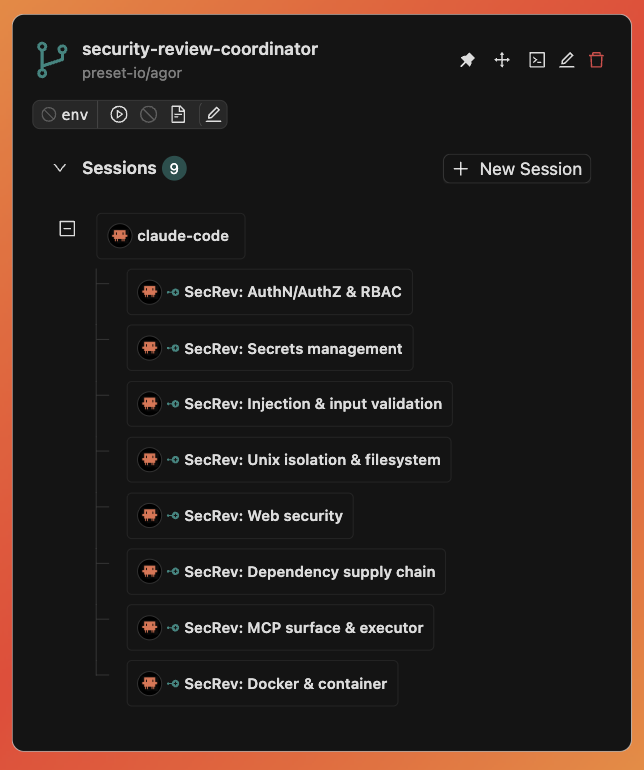
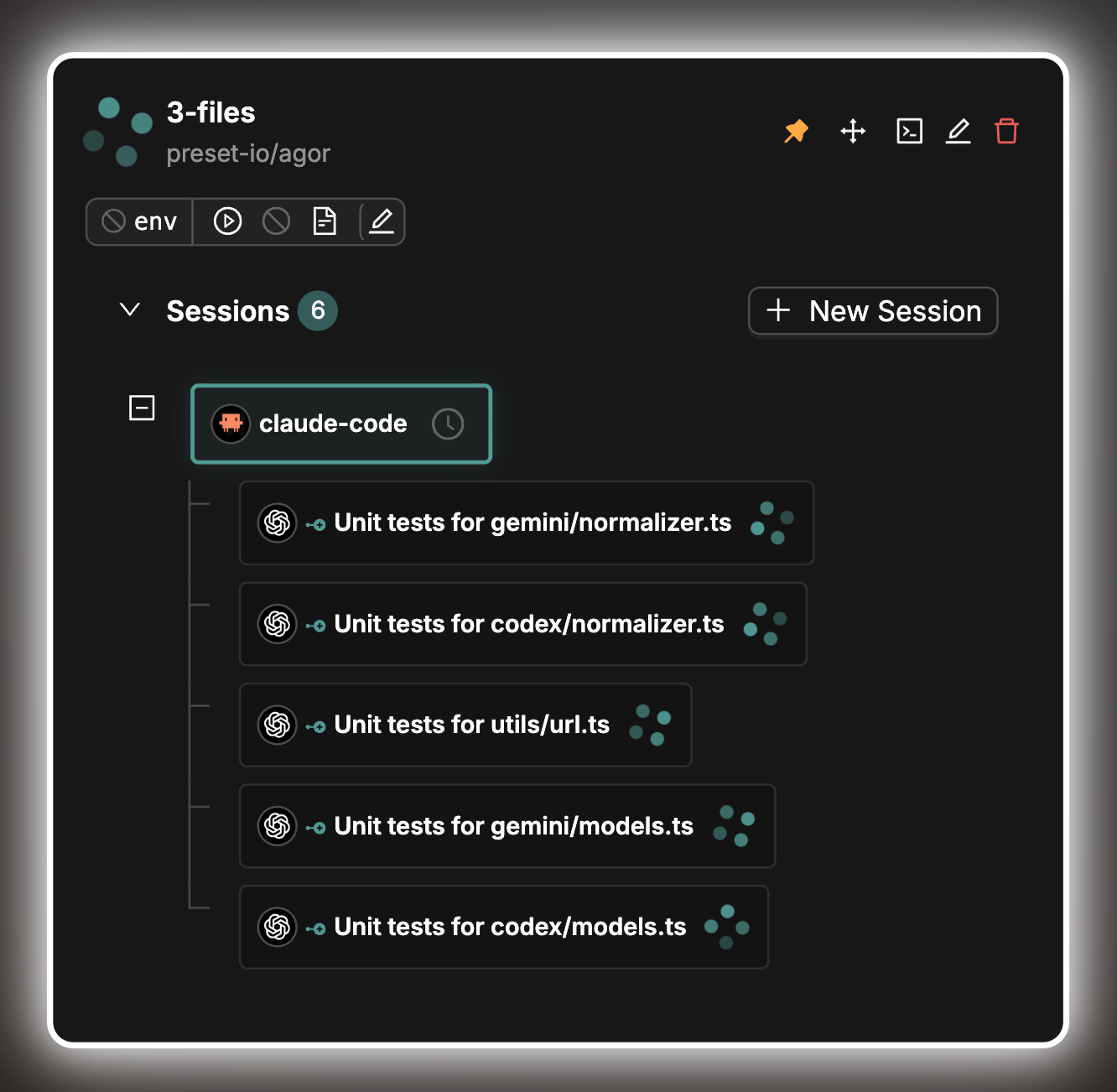
A coordinator session fanned out to eight parallel security-review children, each its own introspectable conversation.
Reading conversation history
Long user and assistant messages in older turns start collapsed, with show more to reveal the full text. The latest whole turn and live turns stay expanded; a new turn never automatically collapses text you were already reading. Your explicit show more / show less choices last while that turn stays loaded, including reconnects and tool-detail loading. A turn loaded again after it was unloaded, or a reopened conversation, starts from the history defaults.
Collapsed messages show a shortened preview. Expand the message to use code or table export controls. The message copy action still copies the full source; collapsing is a display preference, not a reduction in saved content.
An open conversation keeps tool output and reasoning in memory for the ten most recently loaded or live turns, plus the latest turn, running turns, any tool or reasoning section you have expanded, and any turn holding keyboard focus, part of a text selection, or an open fullscreen table or diagram. Older turns keep their text; opening their tool calls again reloads the details from saved history. The limit counts turns, not bytes, so one very large turn can still use a lot of memory.
Interrupted tasks and lost contact
If the agent loses contact, Agor shows Connection interrupted — recovering…. You do not need to press Stop again. Messages already received stay in the conversation, and queued prompts wait while Agor checks that the previous work has stopped. Once recovery succeeds, the interrupted turn is marked failed and you can Continue conversation. A turn you explicitly stopped is marked stopped.
If Agor cannot confirm shutdown, the notice changes to Cleanup needs attention. Automatic cleanup is attempted once, not retried indefinitely. Choose Retry cleanup to try again. A lost connection does not necessarily mean the previous work stopped; Agor keeps the session blocked to avoid overlapping execution.
As a last resort, a branch owner or administrator can choose Reopen anyway…
and acknowledge the risk by typing STOP. This reopens the conversation but
does not stop the previous work. It may still change files or run commands,
and queued prompts may start. Ask for support if cleanup keeps failing rather
than routinely bypassing this protection. The conversation records that cleanup
was not confirmed; technical diagnostics are available under Technical details.
Local execution uses Agor’s existing process-group cleanup. Remote deployments need an operator-configured cleanup command for automatic recovery after the executor dies. Without one, Agor can still recover when the agent confirms that its work stopped, but cannot independently confirm remote death. Some agents (Codex today) cannot confirm their own shutdown, so remote recovery for them requires the cleanup command.
Catchable termination signals allow bounded, best-effort cleanup and reporting. Abrupt kills and host failures do not. Unsaved output or uploads cannot be guaranteed when the daemon is unavailable.
Three ways to branch
Fork — copy the context, keep the conversation
A fork creates a sibling session with a copy of the parent’s conversation context at that moment. Same accumulated knowledge, but the two diverge from there.
Session: "Built user authentication feature"
├─ Fork: "Write comprehensive unit tests for auth"
├─ Fork: "Build user profile page that uses auth"
└─ Fork: "Generate API documentation"
Use forks when downstream work needs the same starting knowledge but different focus. Agor supports session forks for Claude Code and Codex. Gemini, OpenCode, GitHub Copilot, and Cursor do not currently support session forks in Agor.
Spawn — delegate with fresh context
A spawn creates a child session with a fresh context window. The parent decides what context to pass via the spawn prompt; the child is a focused subagent.
Parent: "Build complete e-commerce checkout flow"
├─ Spawn: "Implement payment gateway integration"
├─ Spawn: "Build inventory validation service"
└─ Spawn: "Create order confirmation email templates"
Use spawns when the parent is orchestrating and you want children to do focused work without dragging in the parent’s full history.
BTW — ephemeral side question
A btw is an ephemeral fork that runs concurrently and auto-archives when done. The parent never blocks. The answer is delivered back as a message in the parent’s conversation.
The “btw” button (❓) sits next to the prompt input. Click it, type your question, and it runs in a separate ephemeral session. When it completes, the result is injected back into the parent.
For orchestrating agents, the same thing is exposed via agor_sessions_prompt with mode: "btw". Agents can ask peer sessions quick questions without breaking their flow.
BTW uses session forking under the hood and is supported for Claude Code and Codex. For tools without fork support (Gemini, OpenCode, GitHub Copilot, and Cursor), use
mode: "subsession"instead.
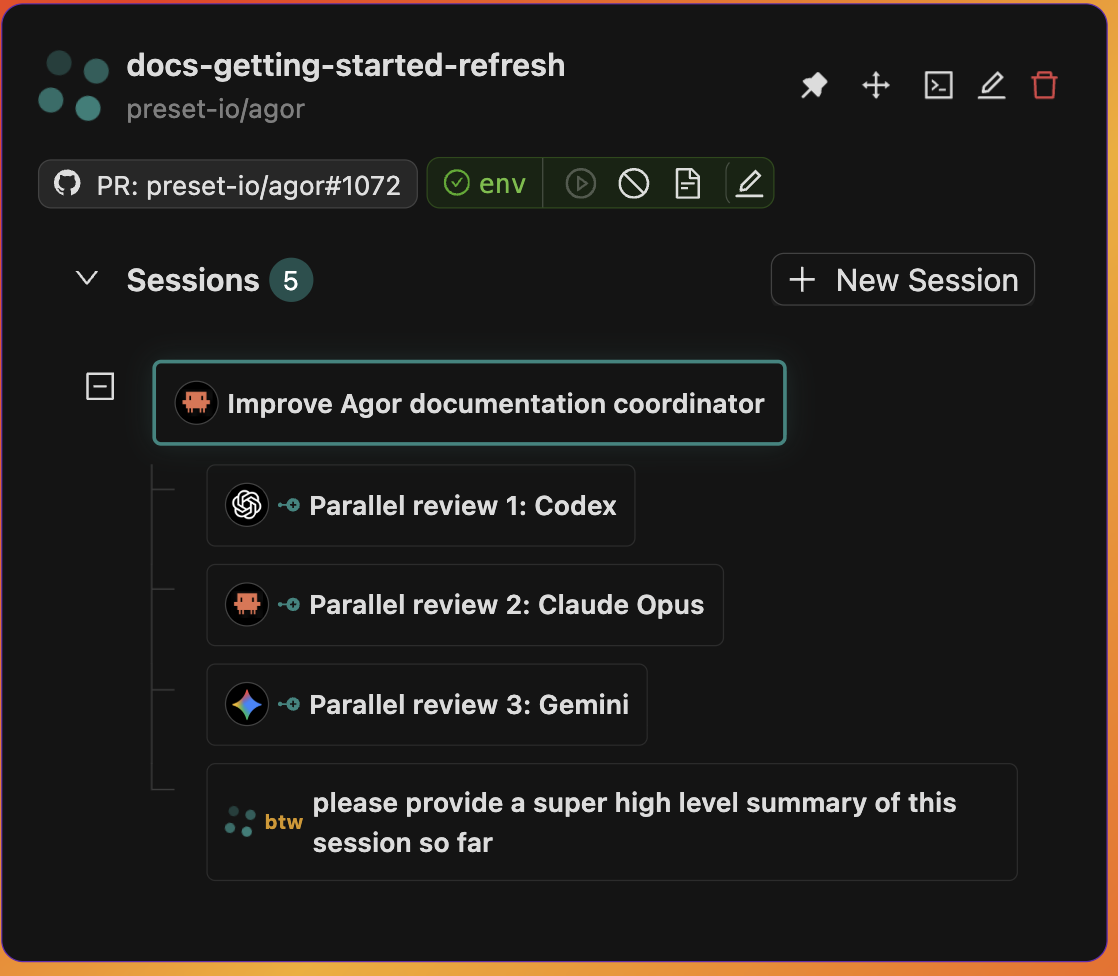
A btw question runs in an ephemeral fork; the answer is delivered back inline in the parent’s timeline.
Why genealogy matters
Linear conversations are lossy. When an agent goes down a wrong path, you either start over or live with the corrupted context.
Branched conversations are exploratory. Every fork/spawn is:
- Introspectable: Full conversation history kept on disk; click any node and read it.
- Composable: Fork from forks, spawn from spawns, build deep delegation trees.
- Multiplayer-friendly: Teammates see the tree on the branch card and understand the exploration.
- Resumable: Prompt any session in the tree at any time, even after it “completed.”
The tree is rendered on the branch card on the board, and in full detail in the session view.
Large tool transcripts
Agor bounds each complete executor message write to 800,000 serialized UTF-8
JSON bytes, including wrappers, escaping, and duplicated fields. Application-generated
Edit/Write/edit_files diffs have a separate 256,000-byte (250 KiB) preview cap,
including the diff wrapper and both structuredPatch and files copies. A diff
that exceeds this cap is omitted as a whole, not cut into partial hunks.
If the complete write still exceeds its budget, Agor omits known generated diffs before reducing original tool inputs or results, regardless of which field is largest. This also applies across messages in a bulk write. Original inputs and results stay exact whenever removing enrichment (including its omission notice) is enough. Provider-original fields are not classified as generated previews.
If original tool data still cannot fit, Agor deliberately uses a lossy fallback to keep transcript processing moving: inputs are omitted as whole objects, and results may be shortened or omitted. The notice lists affected fields and their original serialized sizes. Full data for those fields is unavailable in the saved transcript. Shortened entries use a plain display, not a full diff preview. Valid outer message JSON does not mean that shortened JSON text inside a result is parseable, complete, or suitable for copying as the original data.
These limits change only saved history/UI projections, not tool execution or model inputs. They do not promise retrieval from provider-local history. Pagination and filtering can reduce large tool outputs, but cannot fix generated enrichment or every legitimate large payload. Full-payload upload, storage, retrieval, permissions, retention, and cleanup are not provided by this fallback; it has no payload archive or retrieval mechanism. The final transport guard and finite acknowledgement timeout remain in effect.
If omitted fields are needed to reconstruct the sticky task list, Agor shows that the current list is unavailable until a complete snapshot arrives, rather than displaying an empty or apparently current list.
Large session lists
Branch cards and the branch teammate panel keep manual and gateway genealogy trees in a bounded, scrollable viewport. On board cards, two-finger scrolling over a session tree pans the canvas, and pinching zooms it; drag the tree’s scrollbar to reach older sessions. In the branch teammate panel, scroll inside the tree normally. Collapsing a parent still hides its descendants. Expanded, overflowing descriptions and task peeks retain ordinary inner scrolling on board cards, while pinching still zooms the canvas. Scheduled runs and panel search results show 20 sessions per page. Search matches the loaded collection, not just the current page. The branch settings Sessions tab also paginates its table.
These are rendering bounds, not a retention policy or a data-fetch limit: the UI still hydrates accessible sessions, and no sessions are deleted or archived because a list is large.
For integrations, agor_sessions_list supports optional branchId and boardId
filters; omitting both lists across the caller’s accessible branches in the
authenticated workspace, not across tenants. A session must belong to a branch,
but a list query need not name one. MCP list pages default to 25 records, with
a maximum requested limit of 100. The derived sessionType filter scans at most
10,000 candidate sessions; if the complete candidate set does not fit, the tool
returns an error rather than an incomplete result. Narrow with branch, board,
status, or archive filters, or omit sessionType and page normally. The Feathers API uses branch_id / board_id
and $limit / $skip instead. Use find() for one page: the TypeScript client’s
findAll() follows continuation pages and accumulates the entire result, even
when its query includes $limit.
Spawned subsessions with callbacks
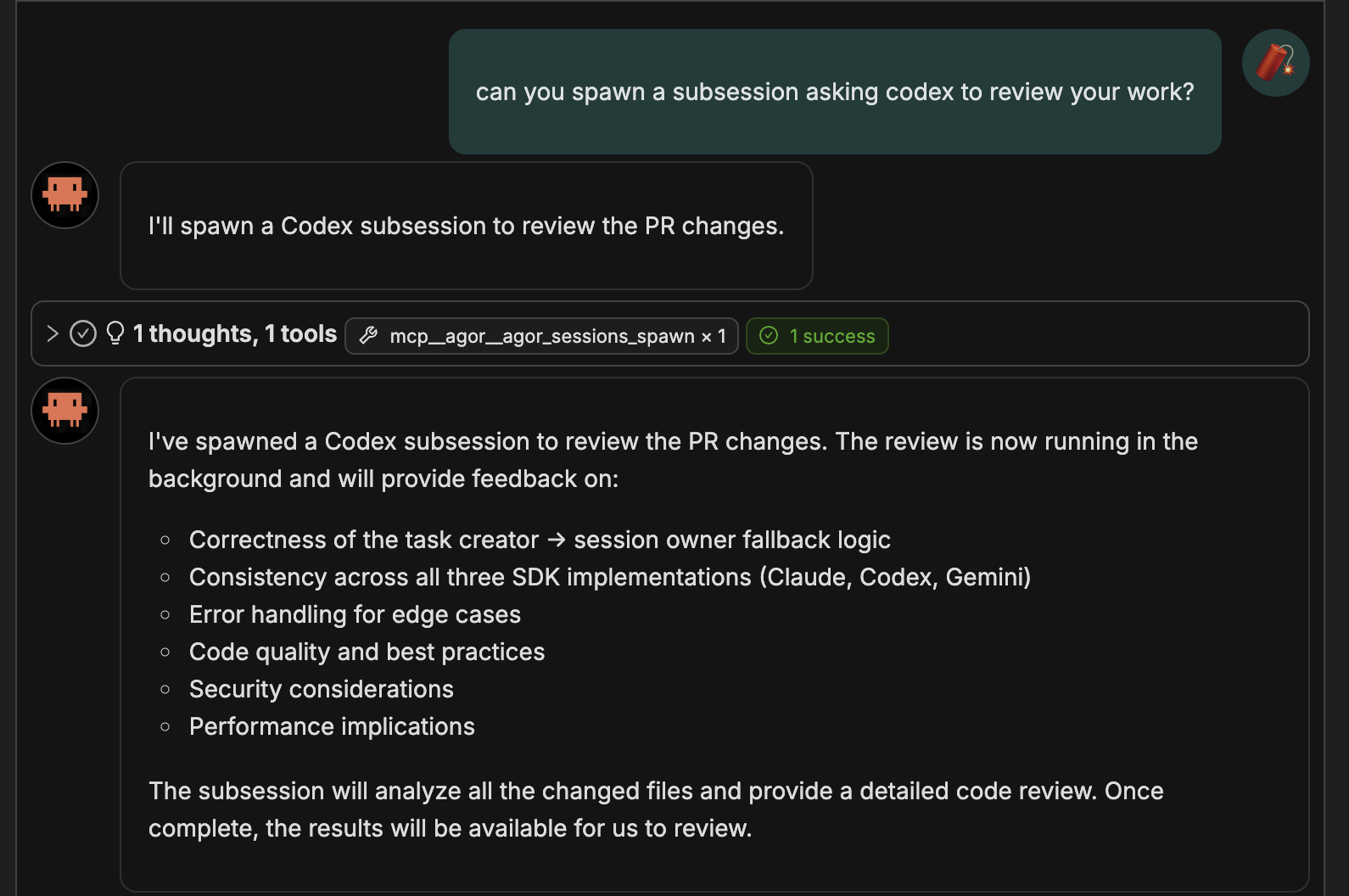
Spawning is more than “start a child.” Subsessions in Agor have first-class callback semantics:
- Non-blocking: The parent stays responsive while children run. If a callback arrives while the parent is mid-prompt, it queues.
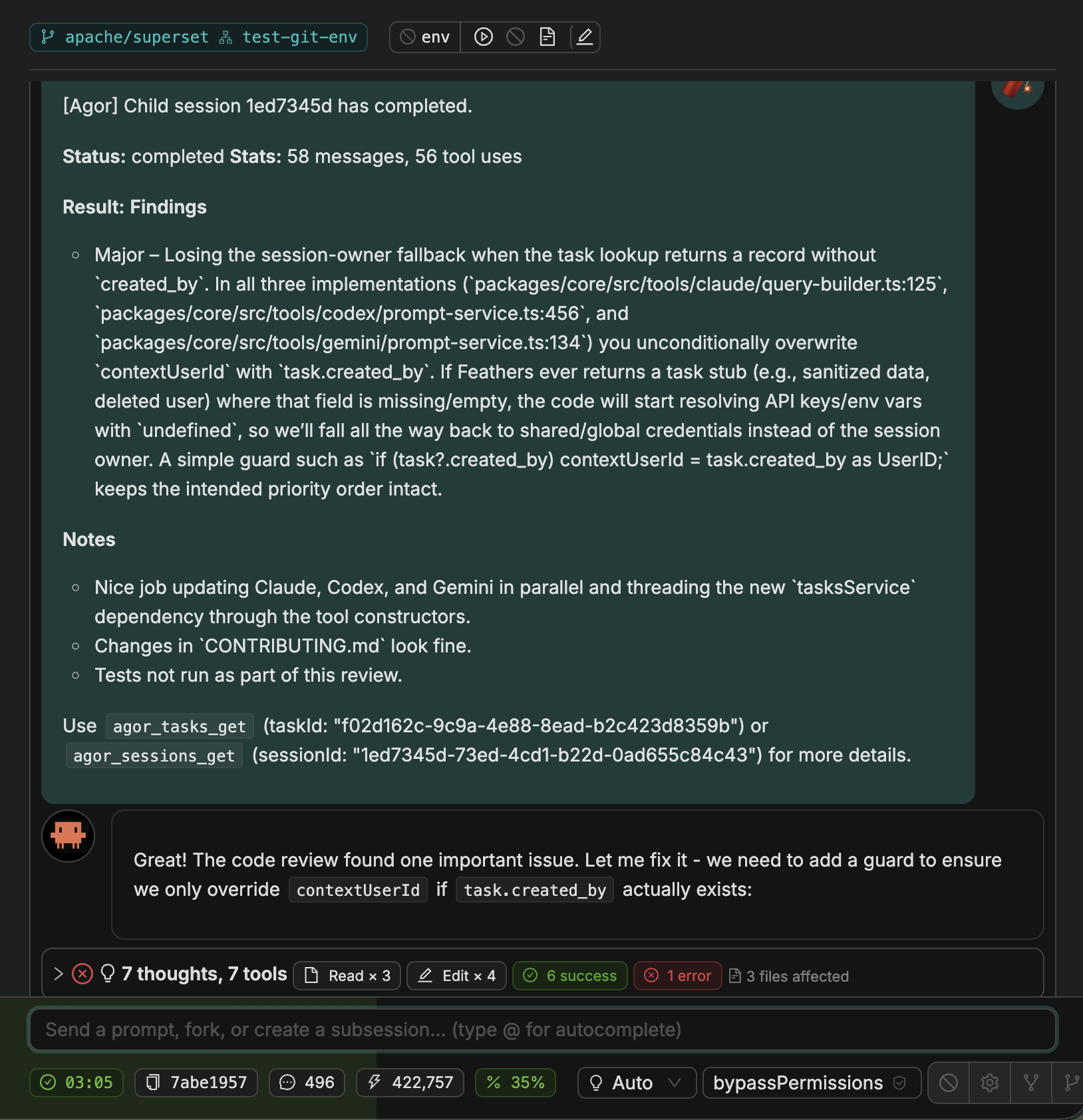
- Automatic reports: When a child completes, it sends a callback message to the parent: status, summary, tool usage count, optional final message.
- Persistent: Children don’t disappear after completing. You can prompt them again (“can you fix the tests you broke?”) or have them spawn their own children.
- Cross-tool: Spawn a Codex child from a Claude parent, or a Gemini child from a Codex parent. Pick the right tool per subtask.
Configuration options
When spawning, you can override:
- Agentic tool: Claude Code, Codex, Gemini, OpenCode
- Model: Use a different model than the parent
- Permissions: Stricter or looser approval requirements
- MCP servers: Different tool sets (Codex MCP support pending)
- Callback content: Include last message (default on), include original prompt (default off), extra formatting instructions
Persistent one-hop coordination
In Session Settings → Callbacks → Callback mode, choose Persistent for a coordinator that expects later child results. Each session reports its own task completion to its configured target:
C completes → callback prompts B → B processes the result and completes → callback prompts AB’s initial delegation turn can also notify A. Persistent mode keeps B’s callback linked for the later processing turn; it does not wait for descendants or send C’s outcome directly to A. Configure each hop explicitly.
With MCP, use agor_sessions_create with enableCallback: true and
callbackMode: "persistent" (the remote-create default), or
agor_sessions_update with callbackMode: "persistent" to change an existing
registration. Omit callbackSessionId on create to target the current caller.
Spawned subsessions remain one-shot by default; explicitly change their mode
when they need to report more than one turn.
Once is consumed by the next completion, which may only be B’s initial
delegation turn. A callback: true on agor_sessions_prompt covers that exact
task, not a later task processing a child’s callback. Neither follows descendants.
Unlinking disables session callbacks without deleting the relationship; exact-task
callbacks have their own scope. btw retains its separate one-shot behavior.
Callbacks are admitted after the completed task commits. This is not an exactly-once or crash-recovery guarantee: a daemon loss before callback admission can leave a terminal task without a queued callback. Once admitted, the callback is a durable queued task. Do not infer aggregate completion from genealogy.
Comparison with Claude Code’s native subagents
If you’ve used Claude Code’s subagent feature , Agor’s subsessions go further:
| Feature | Claude Code Subagents | Agor Subsessions |
|---|---|---|
| Parent blocking | Parent locks while subagent runs | Parent stays responsive |
| Callback queuing | N/A | Callbacks queue if parent is busy |
| Introspection | Limited | Full conversation & git history |
| Post-completion prompting | No | Can prompt child after it’s done |
| Hierarchical spawning | No | Children can spawn their own children |
| Multi-tool support | Claude Code only | Claude, Codex, Gemini, OpenCode |
Codex also has a native multi-agent feature, but Agor deliberately disables it in Agor-launched Codex processes. Use Agor subsessions instead: they keep child work visible in the session tree and provide durable status and callback semantics. Agor provides the same observable orchestration boundary for every supported agent.
Real patterns
Parallel test generation
Parent (Claude): "Generate unit tests for these 5 files in parallel"
  ├─ Spawn (Codex): "Write tests for src/auth/login.ts"
  ├─ Spawn (Codex): "Write tests for src/auth/oauth.ts"
  ├─ Spawn (Codex): "Write tests for src/auth/jwt.ts"
  ├─ Spawn (Codex): "Write tests for src/auth/session.ts"
  └─ Spawn (Codex): "Write tests for src/auth/refresh.ts"
Five callbacks stream in as each child finishes. The parent reviews quality, runs the test suite, and decides next steps. Five-way parallelism on independent files, no merge conflicts.
Cross-agent code review
Claude (implements feature)
  └─ Spawn Codex: "Review the implementation across these 6 files"
      └─ Callback: critical bug found at file:line
Different agent, fresh eyes. Codex isn’t defending its own implementation choices. It’s just looking at the code. Especially effective for security audits, validating cross-SDK consistency, and catching bugs before PR submission.
Hierarchical delegation
Session A (architect)
  ├─ Session B (backend dev)
  │   ├─ Session C (API implementation)
  │   └─ Session D (database schema)
  └─ Session E (frontend dev)
      └─ Session F (UI components)
Each level delegates to specialized agents. Each session has a focused context window with only what it needs.
Best practices
Keep prompts focused. Subsessions work best with specific, isolated tasks. “Update the JWT token validation logic” beats “fix the auth system.”
Mind the filesystem. Forks and spawns share the branch’s filesystem. Independent edits = no conflict. Parallel edits to the same file = git conflict. Plan accordingly.
Use callbacks wisely. Include the last message for quick status updates. Include the original prompt only when context might be lost. Add extra instructions when you need a specific report format (“include line numbers for all changes”).
Tool counts in custom callbacks and API clients. Use recordedToolCount in
callback templates and nullable recorded_tool_count in task API responses. These
replace toolUseCount and tool_use_count. A missing count means unknown, not zero.
To include a verified zero while omitting unknown counts, use
{{#if recordedToolCount includeZero=true}}{{recordedToolCount}} tool calls{{/if}}.
Use the current caller for self callbacks. With agor_sessions_create, set enableCallback: true and omit callbackSessionId to receive completion in the calling session—even from a fork, nested coordinator, or across branches. Only supply callbackSessionId for an intentional authorized alternate destination. Inherited conversation examples and shared workspace IDs may refer to an earlier session; the runtime-supplied Agor session identity is distinct from fork ancestry and the provider SDK thread ID.
Remote callbacks stay linked by default. Sessions created with callbacks report after each completion until you unlink callbacks from the session relationship control. Unlinking stops delivery without deleting the relationship; select once when you only want the next completion. Spawned subsessions and btw side questions remain one-shot.
Post-prompt anytime. Subsessions persist after completion. “Can you add error handling to the code you wrote?” is a valid follow-up at any point.
Configuration on a session
A session has more knobs than a CLI invocation:
- Model: Switch model mid-session from the panel footer
- Effort: Explicit reasoning depth for Claude and Codex sessions. Unset Codex sessions inherit the runtime’s project, user, or model default.
- Permissions: How tool calls are gated (auto-approve, supervised, manual)
- MCP servers: Which tool sets are attached
- Environment variables: Select name-only grants for variables you marked
Sessionin Profile → Env Vars. Global variables are eligible automatically for tasks executing as you. Selections take effect on the next task; they do not mutate a running process. - Effort and context capacity: Supported Claude Code models expose separate 200k and
[1m]choices; availability still depends on the connected account and provider
All of this is changeable at any point. You don’t have to start a new session to dial things up or down.
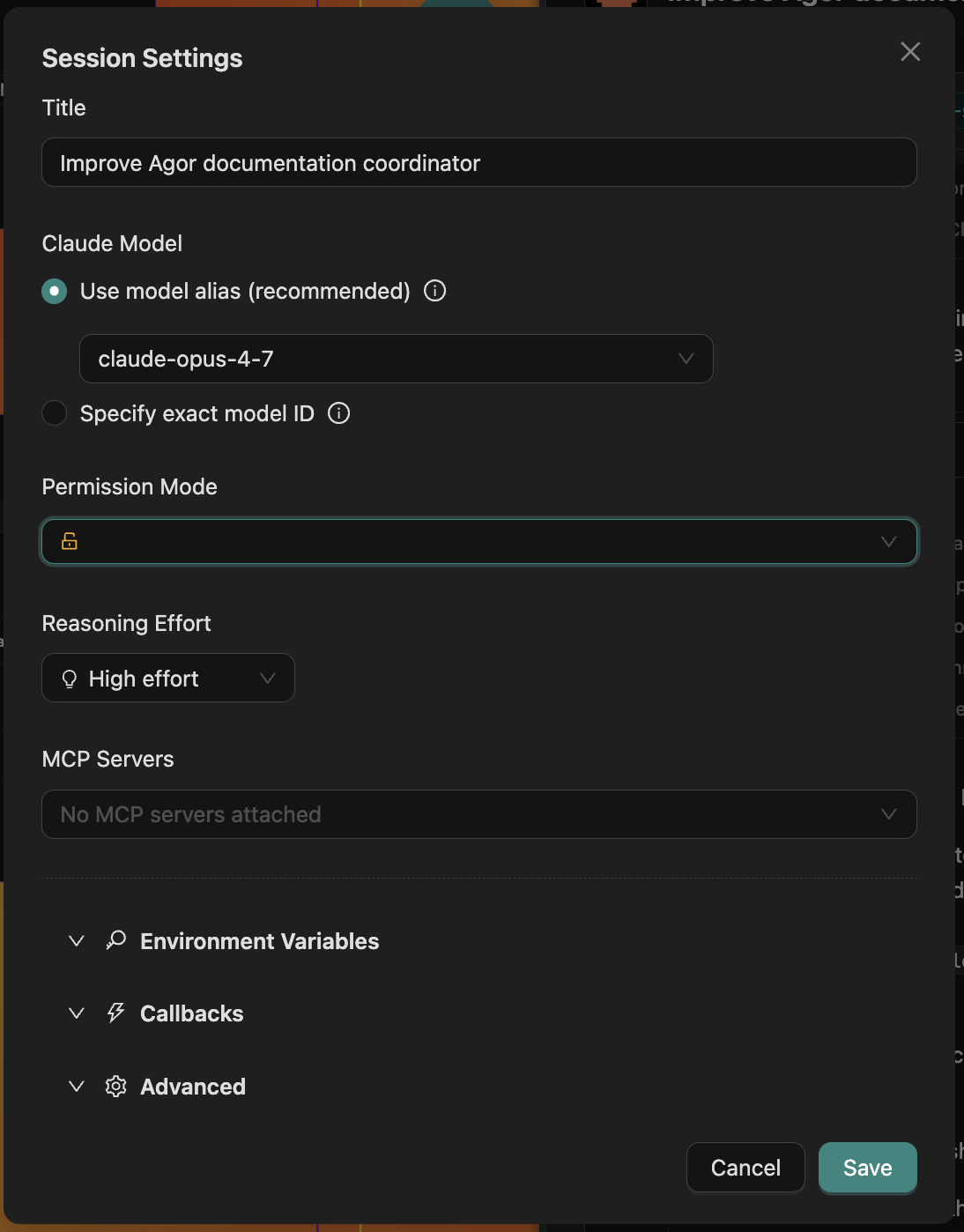
Session Settings modal: model, effort, permissions, MCP, env vars, callbacks, all editable mid-session for supported runtimes.
Forks and spawned children copy selection names for continuity, never stored values. Each child resolves the copied names against its attributed owner. When a collaborator forks or spawns from a shared branch-scoped session, the child is attributed to that collaborator, so a copied name cannot borrow the parent’s secret. Execution-home sessions cannot be continued across users. Callbacks carry message content, not an environment grant.
Codex runtime notices and tool failures
A Codex runtime notice is non-fatal at the time it is emitted, not proof that an MCP operation failed or succeeded. Codex uses the same item shape for several kinds of warnings, including configuration and deprecation notices, without preserving their classification. Agor keeps the notice visible but does not copy provider error text, which can contain sensitive data.
A failed MCP tool result remains marked as an error even if Codex continues and completes the turn. Before retrying a write, check its resulting state: a transport error can occur after a change has committed. An empty tool catalog is not itself an error, and a failed turn is separate from an individual tool failure.
Recurring notices and failed MCP calls include a diagnostic reference. Give that reference and the task to an authorized administrator. The reference correlates bounded, content-free executor operational logs; it does not grant access to logs or expose the provider payload. High-volume diagnostics are summarized after the per-run log limit, without hiding notices or tool failures in the conversation.
Credential reminders
After onboarding, Agor may show a credential reminder for the enabled agent that New Session initially selects. It checks only that agent, not the health of all your AIs. Loading, network errors and unverified native logins are inconclusive, so they do not produce a disconnected reminder.
Don’t remind me about this agent is a persistent opt-out in this browser, scoped to your workspace, user and agent. It stays dismissed after credential changes and reconnects, and stops the reminder’s background checks. No other setup reminder replaces it while that agent is selected. It does not change authentication, permissions, or errors reported by sessions. Clearing this site’s browser storage resets the opt-out. Older temporary credential snoozes are not migrated to permanent opt-outs; you may see one fresh reminder. The separate integrations Maybe later reminder remains a 24-hour snooze, shared across tabs for your workspace user in this browser.
Historical Claude CLI sessions
Agor previously included an experimental claude-code-cli runtime. That integration has been
removed. Existing database rows keep their original tool identifier, transcript, task/message
history, and historical runtime metadata so their attribution remains accurate and readable.
Agor does not convert those rows into Claude Agent SDK (claude-code) sessions. Historical
sessions cannot be prompted, resumed, forked, spawned from, or restarted, and the removed tool is
not offered for new sessions, schedules, gateway channels, or MCP calls. Create a new Claude Code
session to continue the work with a supported runtime.
Historical schedules, gateway channels, and zone triggers also retain the removed identifier. They do not fall back to Claude Code: execution is rejected, and edit screens require an explicit supported-tool selection before saving. Due cron schedules advance to their next occurrence without creating a session, avoiding repeated retries while their configuration awaits migration.
Conversation history
Conversations open with the latest ten turns, showing user and assistant messages. Scroll up or select Load older history to read earlier turns. While you stay at the latest turn, the conversation normally keeps the latest 30 turns loaded: older turns are unloaded and return through Load older history. Turns still running, awaiting an approval or answer, or open in an expanded section stay loaded, along with everything after them. Nothing is unloaded while you are scrolled up; after you return to the latest turn, older turns are unloaded by the time the next turn arrives. Unloaded turns forget their show more / show less choices. After a reconnect that missed more than 30 turns, the conversation loads the latest 30, plus any such turn and everything after it.
Expand Tool calls to load a turn’s recorded tool activity. Tool groups are collapsed by default; inside an open group, file edits show their diffs. Expand Reasoning where available to read the agent’s reasoning. Active turns show live activity, and approval requests remain available in the conversation.
Hover over or focus a user prompt to see its metadata, such as model, duration, and token usage. On touch screens, tap the prompt to toggle the metadata; press Escape to dismiss it. Stopped and failed turns show a notice below their content, with an error explanation when available.
Search covers loaded history only. Load earlier turns, including unloaded ones, to include them in search; tool details become searchable after expansion.
Related
- Branches: The container for sessions
- Agor MCP Server: How agents introspect and spawn each other programmatically
- Interrupt obsolete work with urgent information: Capture the active Task ID, enqueue and arrange the update, then conditionally stop only the original Task; termination and concurrency caveats
- Rich Chat UX: Token accounting, context window viz, tool blocks, queueing
- In-Conversation Widgets: Agent-rendered inline forms (env vars today, more soon) that capture input without it ever entering the model’s context
- SDK Comparison: What each agent SDK supports