Worktrees
A worktree is the primary unit of work in Agor. It’s an isolated git working directory — a checkout of your repo at a specific branch — paired with a metadata record (issue/PR links, owners, environment, sessions) that gives it identity on the board.
Best practice: 1 worktree = 1 issue = 1 PR = 1 feature.
Agor uses git worktrees under the hood, so multiple branches of the same repo can be checked out simultaneously without stashing or switching. Agor manages all of that for you — just create a worktree in the UI or CLI and it handles the git plumbing.
~/.agor/worktrees/<repo>/<name>
├─ feature/oauth2-auth     ← branch checked out here
├─ Sessions: Claude #1, Codex #2 (review fork)
├─ Issue:  github.com/me/repo/issues/123
└─ PR:     github.com/me/repo/pull/456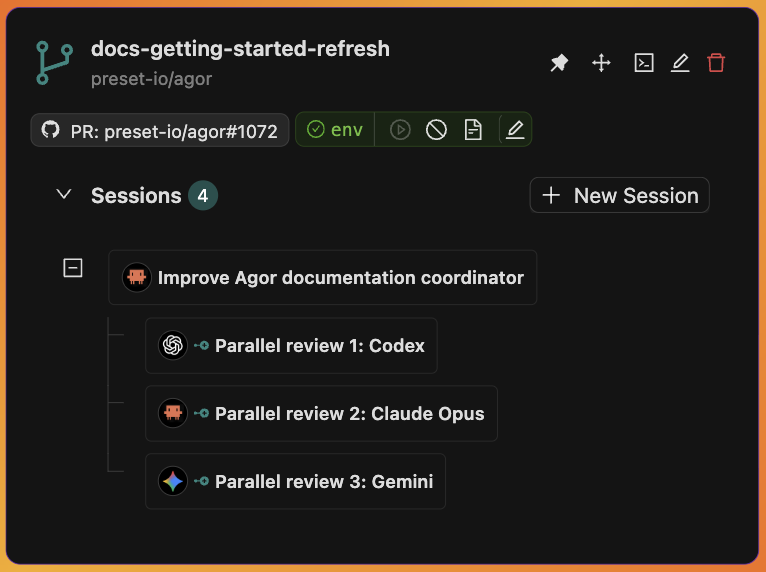
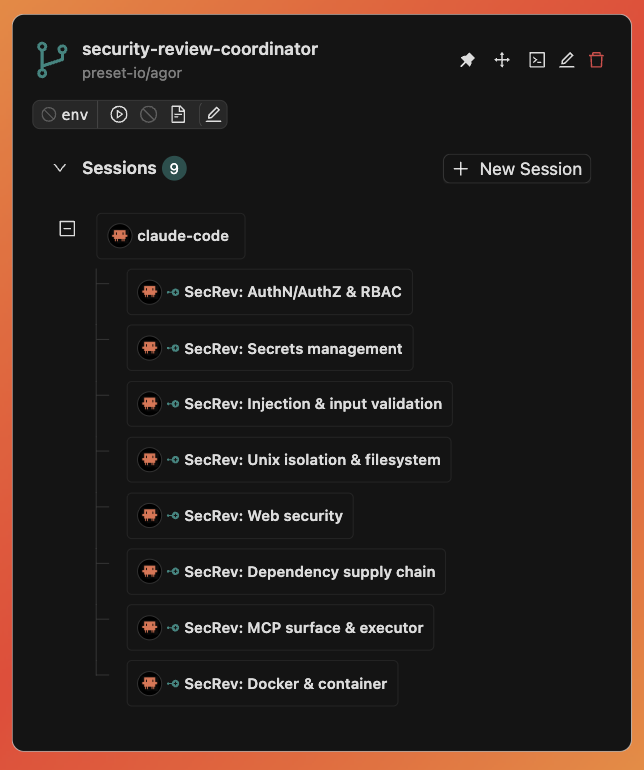
Left: a worktree’s static anatomy — branch, PR, env, files, sessions in one tile. Right: the same primitive packed with a coordinator and eight running children.
Why worktrees, not branches
Branches are a git concept. Worktrees are a workspace concept.
- Parallel work — Run 5 features in 5 worktrees simultaneously. No
git stash, no “kill your dev server so I can test mine.” - Spatial identity — Each worktree is a card on a board. You can see, drag, group, and zone them.
- Session containers — Every session belongs to exactly one worktree. The conversation tree lives on the card.
- Environment scope — Dev servers, ports, and processes are scoped to the worktree, not the repo.
Each worktree is fully isolated — changes in one don’t affect another. AI agents can work on three features in parallel without stepping on each other’s filesystem.
Anatomy
A worktree is a filesystem directory plus a database record. The record tracks:
| Field | Purpose |
|---|---|
name | Human-readable label shown on the card |
branch | Git branch checked out in the working directory |
issue_url, pull_request_url | GitHub linkage — auto-injected into zone prompts |
owners / others_can | RBAC permissions (when worktree RBAC is enabled) |
board_id + (x, y) | Where the card lives on the canvas |
environment | Per-worktree dev environment (start/stop, ports, URL) |
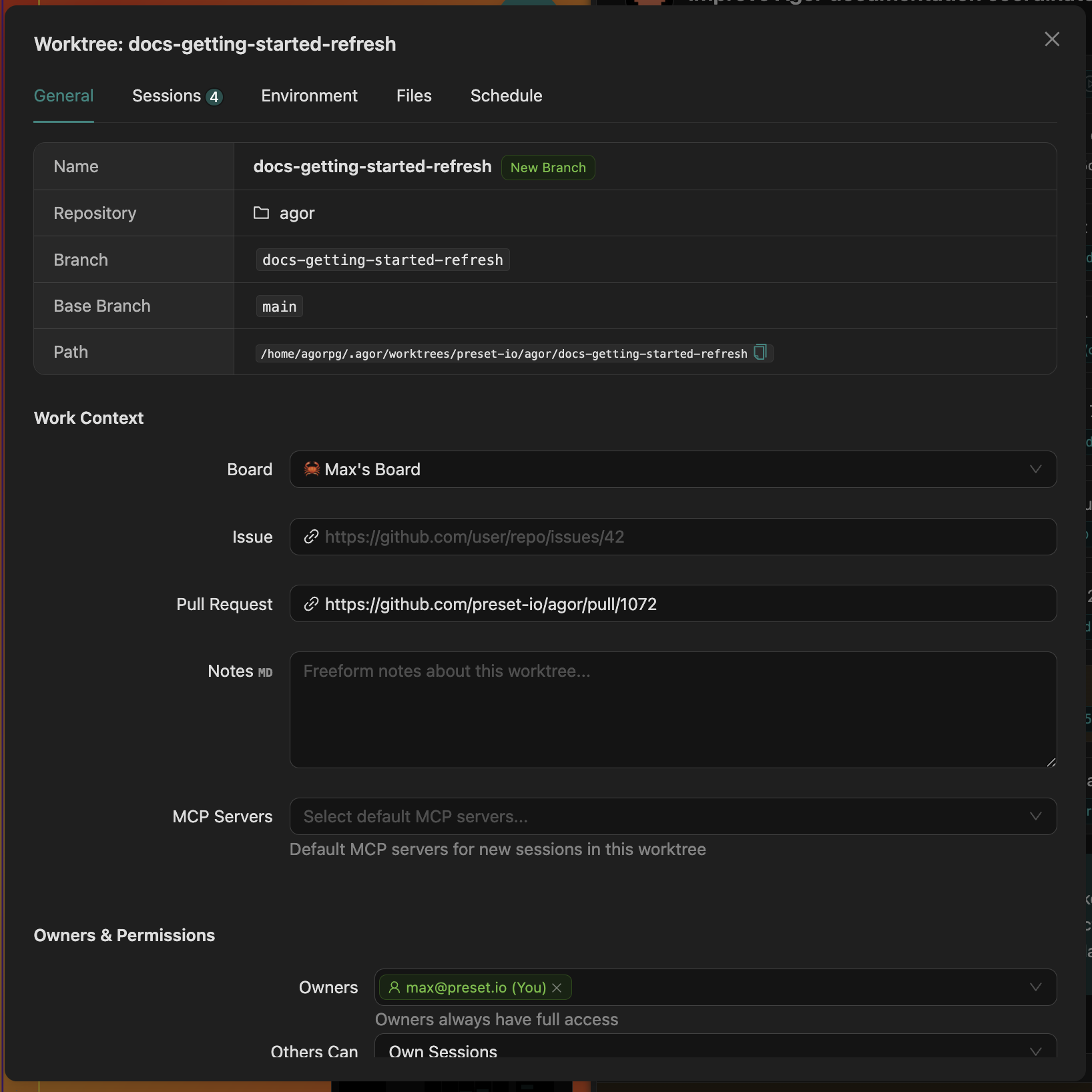
Behind every card: the worktree details modal — General / Sessions / Environment / Files / Schedule tabs. The same fields the table above describes, rendered as actual inputs.
Sessions, tasks, comments, and artifacts all reference a worktree. The worktree is the spine.
GitHub-native workflow
Because each worktree carries issue_url and pull_request_url, AI agents have unambiguous context for what they’re working on. Zones can use that context directly:
deeply analyze this github issue: {{ worktree.issue_url }}When the agent runs, it sees the link, fetches the issue, and works against the right branch. No copy-paste, no “which ticket was this for again?”
Environments
Each worktree can have its own dev environment — long-running processes (dev server, database, watchers) scoped to that worktree, with auto-assigned unique ports so multiple worktrees can run simultaneously without collisions.
Configure once on the repo, then everyone on your team gets one-click start/stop on every worktree.
# Per-repo template, ports derived from worktree's unique_id
up_command: 'PORT={{add 9000 worktree.unique_id}} pnpm dev'
down_command: "pkill -f 'vite.*{{add 9000 worktree.unique_id}}'"
app_url_template: 'http://localhost:{{add 9000 worktree.unique_id}}'
→ Environments guide for the full setup.
Archival
When a feature ships and the PR merges, you usually want to clean up disk without losing the conversation history, analytics, or issue/PR linkage.
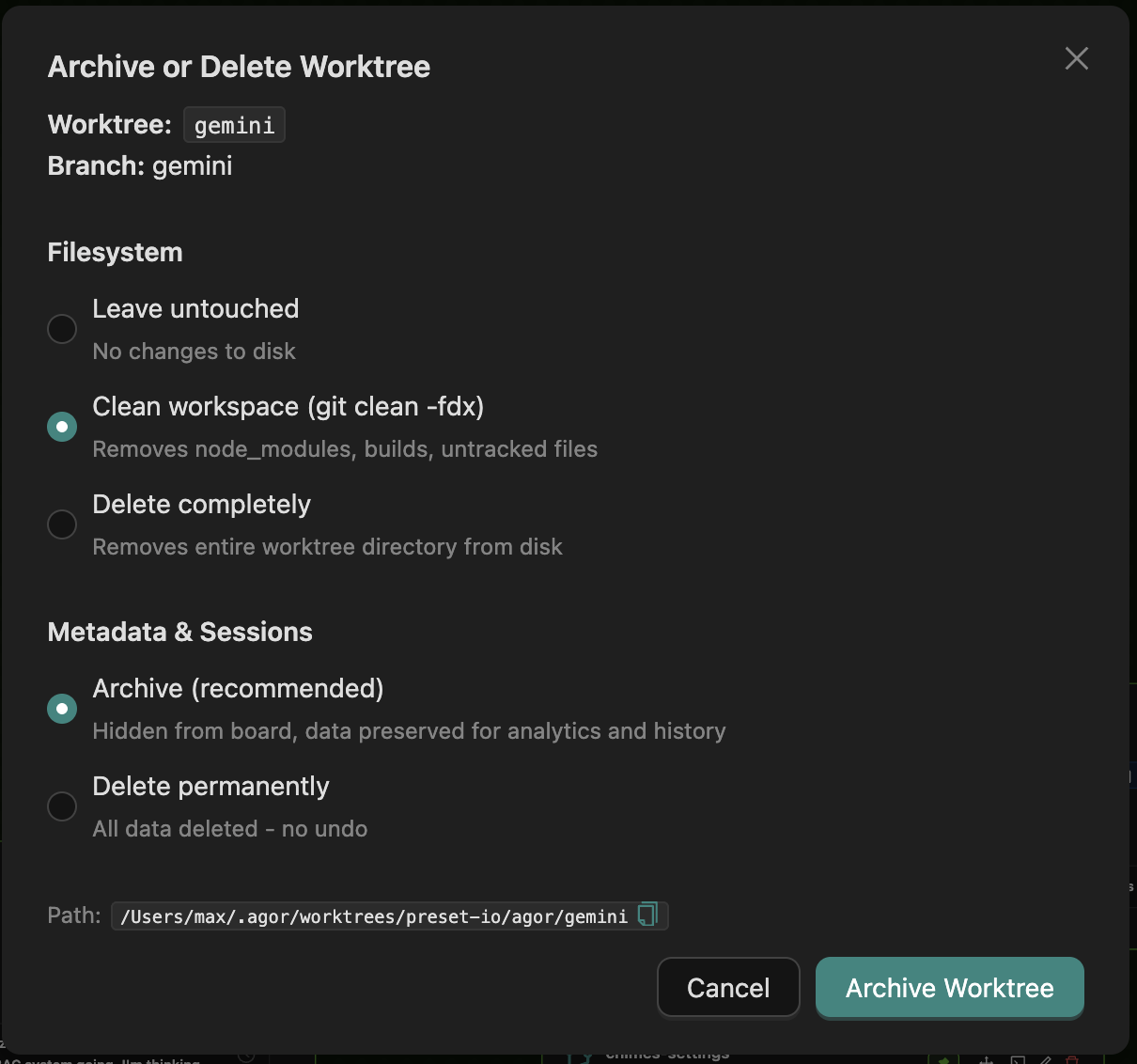
Filesystem options:
- Leave untouched — Metadata-only archival. Files stay on disk.
- Clean workspace — Runs
git clean -fdx(removesnode_modules, builds, untracked files). - Delete completely — Removes the worktree directory from disk.
Metadata options:
- Archive (recommended) — Hides from board, preserves all sessions and conversations for analytics and history.
- Delete permanently — Removes all data including sessions and conversations. No undo.
Best practice: Archive with filesystem cleanup after PR merge. Only delete permanently for experimental worktrees with no valuable data.
Worktree-level features
The worktree is also where several other features attach:
- Sessions & Trees — Every session lives in exactly one worktree. The fork/spawn tree appears on the worktree card.
- Boards & Zones — Worktrees are placed on boards; dropping into zones triggers templated prompts.
- Multiplayer & Social — Spatial comments pin to worktrees; shared terminal sessions are worktree-scoped.
- Scheduler — Templated prompts can fire on a schedule against a specific worktree (great for assistant heartbeats).
Permissions (RBAC)
When execution.worktree_rbac: true is set, worktrees enforce ownership and a per-tier others_can permission:
| Tier | What others can do |
|---|---|
none | No access — completely private to owners |
view | Read worktrees, sessions, tasks, messages |
session | Default. Create their own sessions on this worktree |
prompt | Prompt any session, including others’ (but the session still runs as its creator’s identity) |
all | Full control |
See Security for deployment modes and the trust boundary discussion.
Related
- Sessions & Trees — Conversations and genealogy that live inside a worktree
- Boards & Zones — How worktrees are organized spatially
- Environments — Per-worktree dev environments
- Scheduler — Time-based prompts targeting worktrees