Multiplayer & Social
Agor is great solo. Multiplayer is what makes it Figma.
Just as Figma turned design from a solo activity into real-time collaboration, Agor brings multiplayer presence to AI coding. No more “share your screen” calls or wondering what your teammate’s agent is doing.
👀 Live Cursors
See where your teammates are working in real time. Every user on a board has a cursor showing:
- Position on the canvas
- Name and avatar
- What they’re hovering or dragging
Cursors update every ~100ms, making collaboration feel fluid. Notice someone hovering over a session? Jump in. See them dragging a branch to the same zone? Coordinate live instead of stepping on each other.
Cursor positions are delivered only to people who can currently view that board and who are actively rendering it. Leaving the board, losing access, or disconnecting removes that cursor; an interrupted connection also expires from the canvas after a short timeout.
👥 Facepile
Know who’s online at a glance. The navbar facepile shows active people in your workspace. When a person is focused on a board that you can also view, their tooltip names that board and you can click through to it. If they are on a private board you cannot view, the facepile may show only that they are online—it never reveals the board ID, name, or membership.
Board association is deliberately lower-frequency than the live cursor stream. It is authorized by the daemon for both the publisher and every subscriber, and cursor traffic never substitutes for that separate authorization. Each route/list/focus/reconnect synchronization first retracts the previous board; periodic heartbeats stay boardless until that latest authorization succeeds. Hidden or unfocused tabs publish only workspace-level online status. Each tab/device has its own presence instance, so closing one tab does not make a user disappear while another remains active.
💬 Spatial Comments
Annotate sessions, branches, zones, and boards with threaded conversations.
Leave scoped/spatial comments on:
- Board-level: Team discussions about workflow or priorities
- Zones: “All sessions in this zone need API keys configured”
- Branches: “Ready for review” or “Blocked on API access”
- Sessions: “This approach didn’t work, try the forked version”
Comments create a persistent conversation layer on top of your AI work:
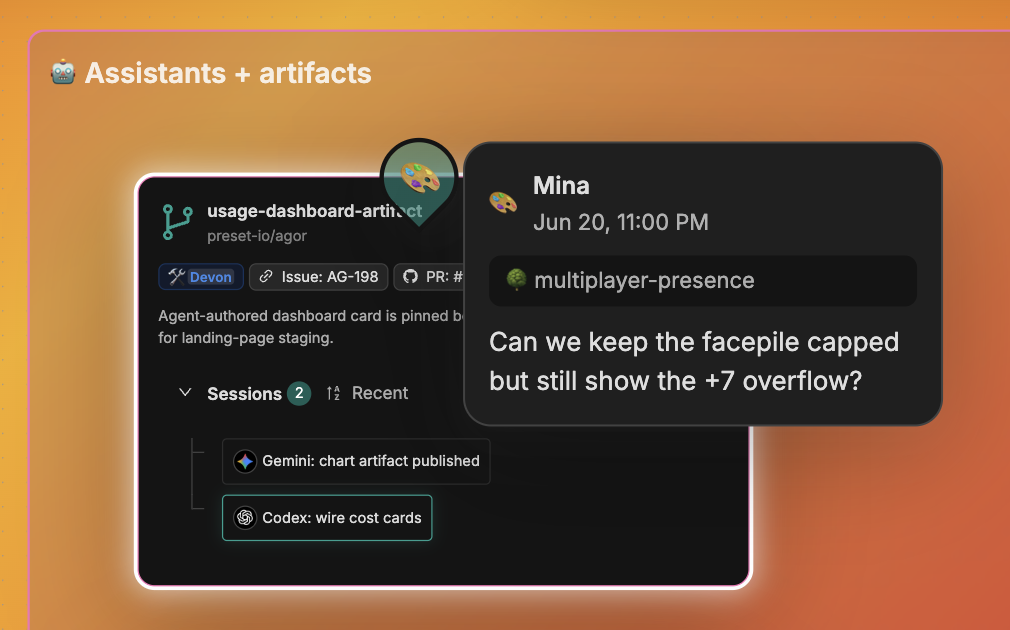
- Thread replies for focused discussion
@usernamementions- Direct links to specific sessions or branches
- Comment history with full timestamps
- Organized by scope in the comments panel (Board → Zones → Branches → Sessions)
The insight: AI conversations are ephemeral. Claude says something, you respond, it’s buried in the chat. Comments are spatial and persistent. Pin them to the exact artifact (zone, branch, session) where they matter. Teammates discover insights without digging through transcripts.
✨ Attention Pulse
Branches pulse teal when they need attention. Sessions ready for input, callbacks waiting to be reviewed, completed long-runs: the branch card pulses on the board so you can pulse-watch from a peripheral browser tab.

Combined with the favicon status dots, you don’t have to keep your eye on Agor to know when something needs you.
🖥️ Multiplayer Terminal Sessions
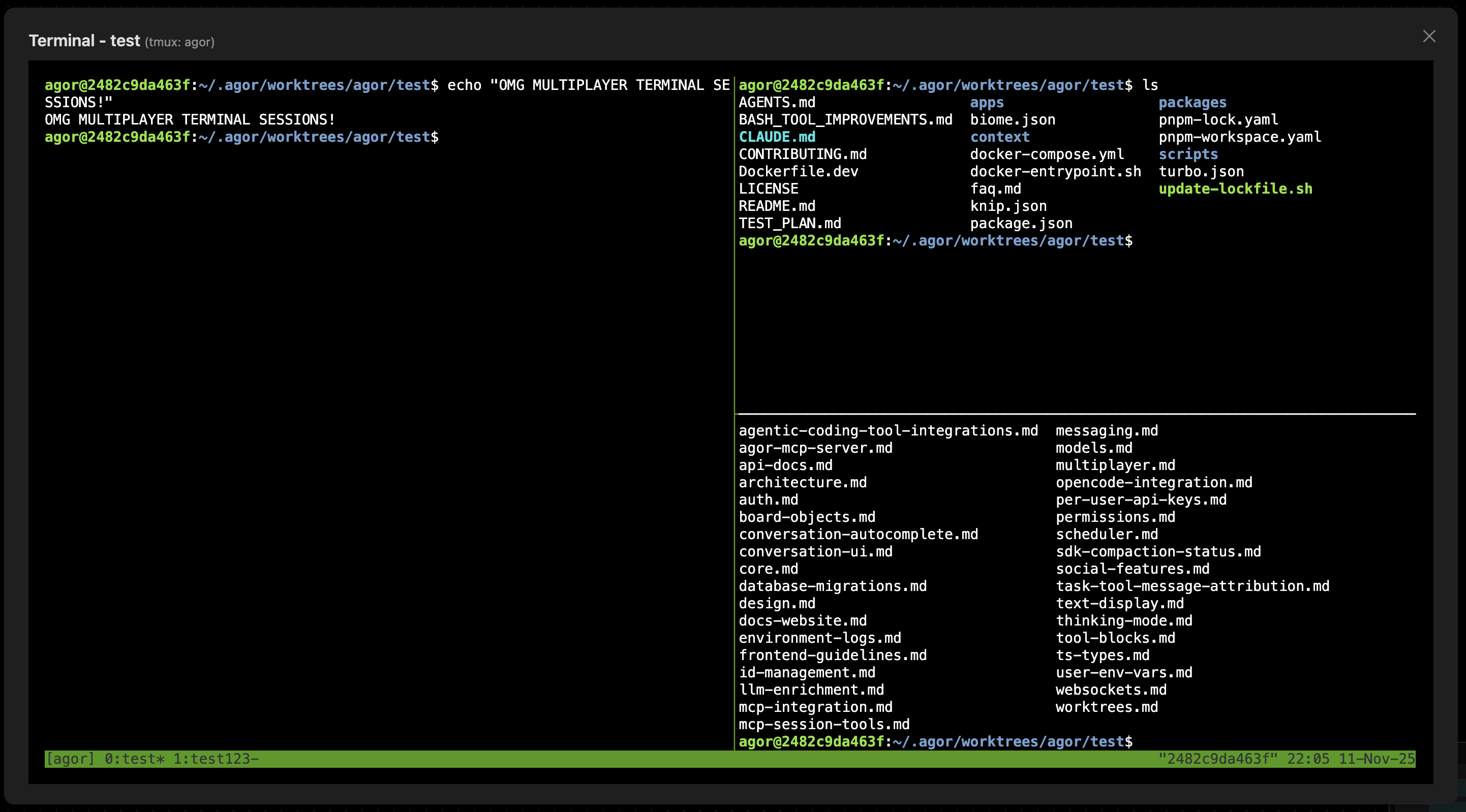
Real-time shared terminals via tmux. When multiple users open the same branch’s terminal, they see each other’s keystrokes live.
How it works
- Each branch gets a dedicated tmux window in the shared
agorsession - Multiple users connecting to the same branch attach to the same window
- WebSocket broadcasting synchronizes keystrokes and output
- Works automatically when tmux is installed; no configuration
Use cases
- Pair programming: Two devs in sync on the same feature
- Live debugging: One person navigates while another observes
- Onboarding: Senior dev demos commands; junior follows along
- Code review: Reviewer explores the branch interactively during review
Terminal sessions are branch-scoped. Users only see terminals for branches they’re actively using.
Privacy note: With
unix_user_mode: simple(the default), the terminal runs as the daemon user and givesmember+users access to daemon-readable files (config, DB, JWT secret). Usesandboxmode in shared Linux environments. See Security.
🌐 Real-Time Strategy for AI Teams
The combined effect of cursors + facepile + comments + zones + presence is something like an RTS for engineering work:
- Watch teammates and agents move across tasks live
- Cluster sessions, delegate, pivot, iterate together
- Drag a branch across the board and the trigger fires for everyone watching
This is the part that’s hard to convey in a doc. Try it on a board with one other person and you’ll feel it.
⚙️ Per-User Settings
Multiplayer is more than presence. Every user brings their own credentials, env, and tool config to the boards they share.
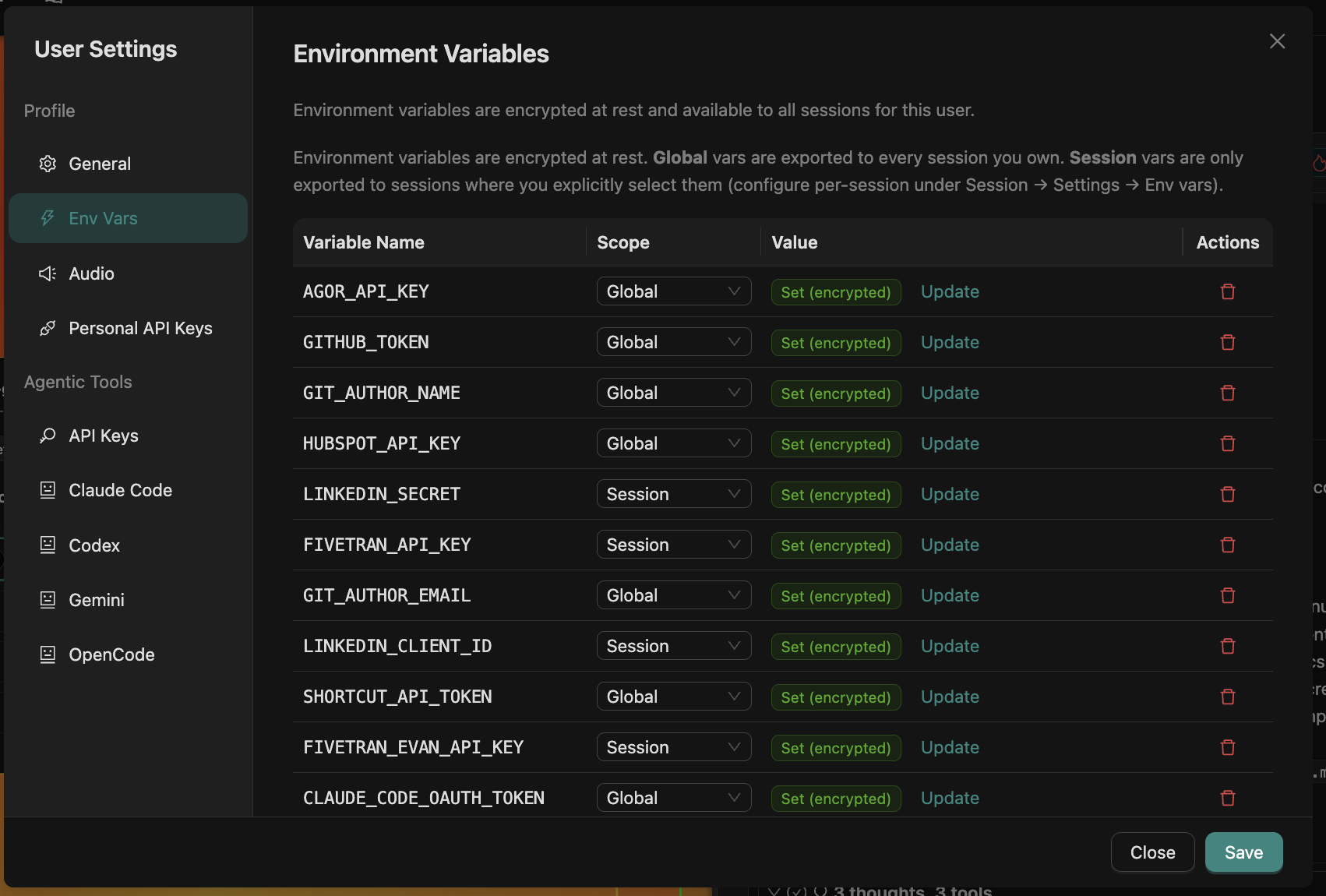
The settings panel is split into two surfaces:
Profile
- General: display name, avatar, email, role.
- Env Vars: encrypted environment variables, scoped
Global(eligible for tasks executing as you) orSession(eligible only when selected under Session → Settings → Env Vars and the session is owned by the same execution user). Useful forGITHUB_TOKEN,HUBSPOT_API_KEY, vendor credentials, or anything you’d otherwise paste into a.env. - Audio: chime / notification preferences for attention pulse and session events.
- Agor API Tokens: issue tokens for scripting Agor itself (CLI / external tools).
Agentic Tools
- Claude Code / Codex / Gemini / OpenCode / Copilot: per-runtime config: provider credentials, default model, permission mode, extra arguments. Workspace policy determines whether personal or workspace authentication is required or preferred. Shared machine CLI login state is not used implicitly.
Why per-user matters in multiplayer
When teammates share a board, sessions still execute under a specific user’s identity:
- A task uses its durable prompter’s execution home, generic env vars, and task credentials. A foreign prompt is allowed only for an explicitly shareable branch-home Session; the conversation and branch SDK state remain attached while caller identity stays consistent.
- Resolution precedence is: allowlisted host runtime → gateway fallback values → the task user’s globals and eligible session selections → gateway force-overrides → narrow trusted executor fields. Provider credentials are resolved separately for the selected agentic tool.
- Session selection rows contain names only. A selected name resolves only for a session owned by the same execution user, so a foreign session cannot select a same-named secret from the prompter’s profile.
- In
unix_user_mode: sandbox, the executor runs as the daemon user inside an RBAC-derived filesystem boundary.
Fork/spawn creation copies selected variable names, not values. The child resolves those names against its own attributed owner at its next task; for a shared branch-home Session that is the caller. A scope/selection change affects future launches, not an already-running process. Gateway and scheduled sessions use their configured execution owner; gateway-specific values are channel configuration, not implicit access to another user’s profile.
This is what makes co-locating teams on one Agor instance work without secret-sharing: everyone keeps their own credentials, but the boards, branches, and conversations are shared.
🔌 Connected MCP Servers (Per-User OAuth)
Bring your tools (Slack, Linear, GitHub, HubSpot, custom internal MCP servers) and let Claude / Codex / Gemini call them with your authority.
Agor speaks the full MCP transport matrix:
stdio: local binaries (@modelcontextprotocol/server-filesystem,@modelcontextprotocol/server-github, etc.).sse/http: remote HTTP-based MCP servers, with header-based auth or OAuth 2.1.- Strict MCP OAuth by default: Agor binds protected-resource and authorization-server metadata, sends the protected
resource, requires PKCE S256, validates the issuer returned to the callback, and requires HTTPS endpoints. Exact loopback HTTP is allowed only for standalone/SQLite development; PostgreSQL and hosted deployments reject it. A narrow Legacy compatibility setting enables non-standard discovery only for a server that needs it; Agor never silently downgrades. - Client registration: pre-registering an OAuth client is preferred. Dynamic Client Registration is disabled by default and can be enabled only as an explicit per-server fallback.
- Durable PostgreSQL grants: access/refresh tokens and the client credentials bound to a grant are encrypted with the deployment master secret in tenant-scoped rows. Protect the database, backups, and
AGOR_MASTER_SECRETas credential-bearing infrastructure.
Per-user, not per-instance
Each user authenticates their own OAuth grant per MCP server. When a session attaches an OAuth-secured MCP server, Agor injects the acting user’s token, never another user’s. PostgreSQL coordinates rotating-token refresh across daemons. The UI refetches durable state after realtime hints, so a callback handled by another daemon still converges correctly.
Catalog Connect first prefers the user’s canonical install of that catalog entry. It may reuse an existing or freshly refreshed credential peer only when endpoint, transport, scope, client-registration settings, and effective compatibility policy exactly match the current catalog. The connect response identifies catalog_install, credential_peer, or refreshed_credential_peer reuse and exposes the secret-free effective policy. A credential peer remains the original Settings row: disabling or deleting it also disables or removes the session dependency; deleting the session does not delete that pre-existing row. Catalog drift or removal makes an unstated peer policy strict and prevents reuse when the current entry differs.
New SQLite and PostgreSQL grants carry a versioned configuration fingerprint. Historical SQLite grants may be unbound; they are accepted only when their recorded protected-resource URI still matches. Standalone SQLite assumes the daemon account and database file are trusted—direct database write access can forge configuration and grant metadata and is therefore equivalent to deployment compromise. Hosted PostgreSQL additionally enforces tenant scoping/RLS and durable binding at the database boundary.
Per-user grants are self-service. A server configured with a shared grant uses one workspace credential; only a current admin can start, complete, refresh/replace, or disconnect it. Disconnect removes the grant from Agor but does not revoke it at the OAuth provider. Use the provider’s security settings when provider-side revocation is required.
This is how a shared Linear or Slack MCP server can sit on the team’s Agor instance and still respect each member’s individual permissions. Your prompt against Linear runs with your Linear scope, your teammate’s runs with theirs.
Configuration scopes
| Scope | Where defined | When attached |
|---|---|---|
| Instance MCP servers | Admin → MCP Servers | Available to be selected by any session |
| Per-session selection | Session → Settings → MCP Servers | Toggled on per session |
| Per-channel attachment | Gateway channel config | Auto-attached for sessions that channel spawns |
| User OAuth grants | User Settings → MCP authorizations (per server) | Bound automatically when that user is the actor |
Pairing with the Message Gateway: a Slack-routed session that runs as the matched Agor user, with that user’s OAuth-authenticated Linear MCP server attached, can take Linear actions under the human’s identity: no shared service account, full audit trail.
Related
- Boards & Zones: The spatial canvas itself
- Branches: The primary entity that pulses, gets commented on, and hosts terminals
- Rich Chat UX: Favicon dots, chimes, queued messages
- Agor MCP Server: The other side: Agor exposing itself as an MCP server to agents
- Message Gateway: How external messaging maps to Agor user identities
- Security: Trust boundaries for shared terminals and credentials