Cards
Beta. Cards are a new feature. The data model and MCP tools are stable, but the UI and workflows are evolving based on feedback.
Every entity on an Agor board used to be a branch, a git branch tied to a repo. That works for coding, but what about support tickets, sales leads, patient records, or content pipelines?
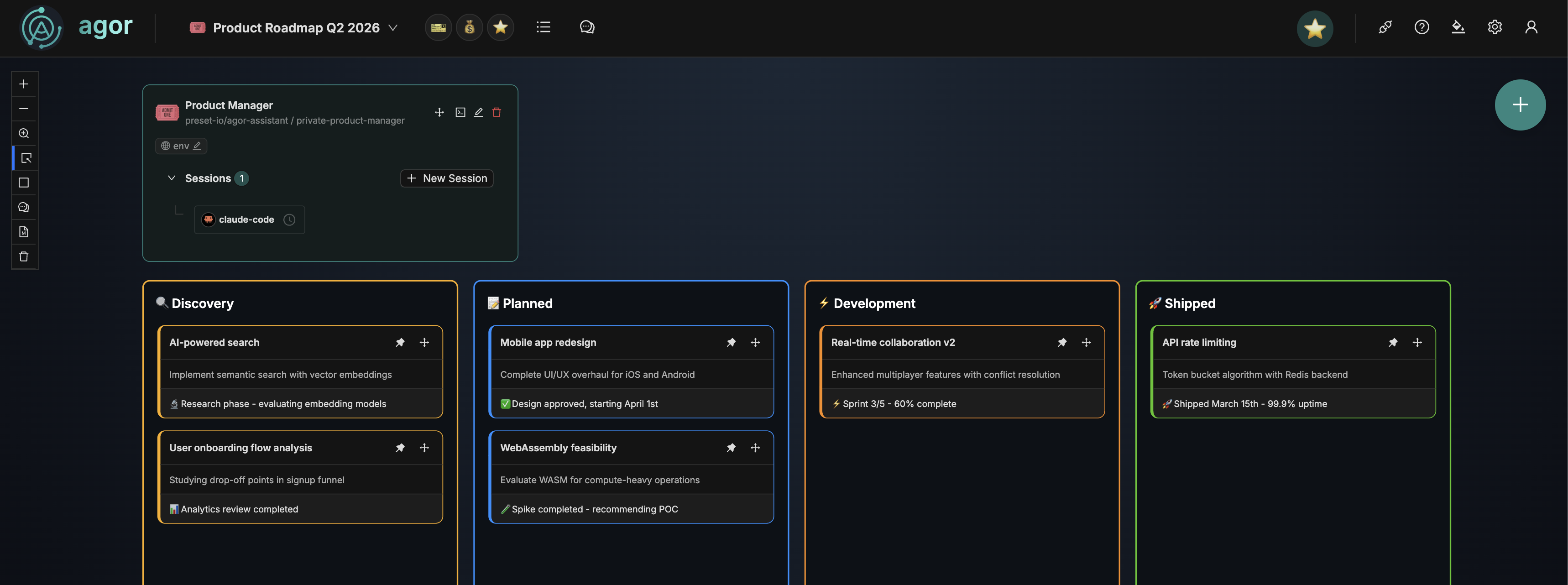
Cards are generic entities that live on boards alongside branches. They give you spatial oversight of any workflow, not just code. An teammate creates and manages cards via MCP tools, and you see the work unfold on the board in real time.
The board becomes a dashboard: 12 tickets in triage, 8 being worked, 3 escalated, 27 resolved, all at a glance, without asking the agent “what’s the status?” The spatial layout IS the status.
How it works
A teammate manages cards through Agor’s MCP tools. The typical flow:
- Define Card Types. Create types like “Ticket”, “Lead”, or “Patient” with an emoji, color, and optional JSON schema
- Create cards. The teammate creates cards on a board, placing them directly into zones
- Move cards through zones. As work progresses, the teammate moves cards between zones (Triage → In Progress → Resolved)
- Update cards. The teammate keeps cards current with descriptions, notes, and structured data
Cards are dumb by design in v1. They don’t trigger automation or spawn sessions. The teammate is the brain. Cards are how it shows you what’s happening.
Card anatomy
Every card has a clear information hierarchy (what you see at a glance vs. what you see on click).
Visible on the board:
- Title. What is this thing. Clickable link if a URL is set
- Description. Stable context about the entity. Collapsed after a few lines with “show more”
- Note. The teammate’s live commentary, always shown in full with distinct styling. Ephemeral, updated by the teammate as the card progresses
Visible in the detail modal:
- Data. Structured JSON blob for workflow state. Not a system of record, just a local cache that lets agents keep context without round-tripping to external APIs. Each workflow defines its own schema
Card Types
Card Types define the visual identity and optional data schema for a category of cards. They’re global. Define a type once, use it on any board.
A Card Type has:
- Name. “Support Ticket”, “Sales Lead”, “Patient”
- Emoji. Default emoji shown on all cards of this type
- Color. Default color for the card’s visual treatment
- JSON Schema (optional) validates the structured
datafield on cards. No auto-form generation. Agents set data directly via MCP
Individual cards can override the emoji and color (e.g., to flag a critical ticket red), but normally they inherit from their type.
Boards as dashboards
Cards work with the same zone system as branches. Define zones on your board, and cards move between them as a visual pipeline:
┌─ Triage ──────┐   ┌─ In Progress ─┐   ┌─ Resolved ────┐
│ 🎫 Login bug  │   │ 🎫 API limits │   │ 🎫 Dark mode  │
│ 🎫 CSV export │   │ 🎫 SSO issue  │   │ 🎫 Search fix │
│ 🎫 Timeout    │   │               │   │ 🎫 Cache bug  │
│               │   │               │   │ 🎫 Auth flow  │
└───────────────┘   └───────────────┘   └───────────────┘
A card’s zone is its status. No separate status field. The board tells the story.
MCP tools
Teammates manage cards entirely through MCP. The key tools:
| Tool | Purpose |
|---|---|
agor_card_types_create | Define a new Card Type (emoji, color, schema) |
agor_card_types_list | List all available Card Types |
agor_cards_create | Create a card on a board, optionally into a zone |
agor_cards_update | Update title, description, note, data, or overrides |
agor_cards_move | Move a card to a different zone |
agor_cards_list | List cards, filterable by board, type, or zone |
agor_cards_archive | Soft-archive a card (removes from board, retains data) |
agor_cards_delete | Permanently delete a card |
agor_cards_bulk_create | Create many cards at once (e.g., importing from Jira) |
agor_cards_bulk_move | Move a batch of cards between zones |
Use cases
Cards work for any workflow where entities move through stages:
| Domain | Cards | Pipeline |
|---|---|---|
| Support | Tickets | New → Triage → In Progress → Resolved |
| Sales | Leads | Pipeline → Qualified → Proposal → Closed |
| DevOps | Incidents | Detected → Investigating → Mitigating → Resolved |
| Content | Articles | Draft → Review → Published |
| Migration | Dashboards | Assess → Migrate → Validate → Done |
| Healthcare | Patients | Intake → Triage → Treatment → Discharge |
In each case, a teammate processes the work while the board gives you real-time visibility. You see the pipeline without reading chat logs or asking for status updates.
Managing cards
Settings → Cards gives you full CRUD access to Card Types and Cards.
The three-column layout lets you browse: Card Types → Cards of that type → Card detail. Most card management happens through agents, but the Settings UI is there when you need direct access.
Cards can also be clicked on the board canvas to open a detail modal. Same view, two entry points.
What’s next
Cards in v1 are intentionally simple. Agents manage everything, cards are visual feedback. Future iterations may explore:
- Card events. Track who moved what, when, enabling teammates to react to user actions on the board
- Zone triggers for cards. Moving a card into a zone could notify a teammate automatically
- Dynamic forms. Auto-generate edit forms from Card Type JSON schemas
- List layout zones. Ordered Kanban-style columns for boards with many cards
Related docs
- Teammates (the persistent agents that manage cards)
- Agor MCP Server (the MCP tools teammates use)
- Scheduler (automated heartbeats for teammate-driven card workflows)