Boards & Zones
Boards are 2D spatial canvases for organizing branches. Like Figma for AI coding work. Drag, group, comment, collaborate in real time.
Instead of linear lists or kanban columns, every branch lives at an (x, y) coordinate on a board. Sessions appear as a genealogy tree on the branch card. Multiple users see the same canvas with live cursors.

An Agor board staged for an active team: live cursors, roomy workflow zones, branch cards, markdown planning notes, and agent-built dashboards sharing the same canvas.
Why spatial?
Your brain remembers space. You remember:
- “The auth branch is in the top-left corner.”
- “Testing sessions cluster on the right.”
- “That failed experiment is way down there.”
This is location-based memory, the same reason you remember where you parked but forget a shopping list. A 2D board gives every branch and session a place. Linear lists discard that.
Like Figma did for design, Agor brings spatial collaboration to AI coding:
- Everyone sees the same board.
- Real-time cursors show where teammates are working.
- Drag a branch, teammates see it move instantly.
See Multiplayer & Social for the full collaboration story (cursors, facepile, comments, attention pulse).
Zones
A zone is a spatial region on a board that triggers a templated prompt when a branch is dropped into it.
Drag a branch into “Code Review” → auto-prompts the agent for review. Drag into “Needs Tests” → auto-prompts for test generation. Drag into “Ship It” → auto-prompts for changelog + PR description.
Zones turn your board into a workflow engine. Spatial position means something. It triggers behavior.
Editing a zone
Select a zone to show its compact board toolbar:
- Rename, appearance, and lock position and size cover the common edits.
- Zone settings opens on Automation, where you configure the prompt and how it starts. Appearance & placement contains the name, border and fill colors, label size, and placement lock.
- More → Arrange contains the less common layer controls (bring forward/front and send backward/back). When zones overlap, the visually topmost zone is also the drop target.
- More → Delete zone removes only the zone. Pinned branches, cards, and comments are unpinned at the same visible board positions; their content and sessions are kept.
Locking a zone prevents moving and resizing it; it does not prevent renaming it or changing its settings. Viewers do not see editing controls. Editors, managers, and the board owner can edit zones.
How zone triggers work
When you drop a branch into a zone:
-
Session selection: which session gets the prompt?
- Show picker (default): choose a session and action when the branch is dropped
- Always new: create a new root session automatically
-
Templated prompt executes: the zone’s Handlebars template renders with dynamic data from the branch, board, repo, and environment.
Handlebars template variables
Zone prompts have access to:
- Branch:
{{ branch.name }},{{ branch.issue_url }},{{ branch.pull_request_url }},{{ branch.unique_id }} - Board:
{{ board.name }},{{ board.description }} - Session:
{{ session.title }},{{ session.description }} - Environment:
{{ environment.url }},{{ environment.status }} - Repo:
{{ repo.name }},{{ repo.default_branch }}
Example zone prompt
Review the implementation of {{ branch.issue_url }}.

Check if:
1. All acceptance criteria from the issue are met
2. Edge cases are handled
3. Error messages are user-friendly

If approved, comment on {{ branch.pull_request_url }} with summary.
Drop a branch → auto-prompts with issue and PR links pre-filled. No copy-paste, no forgetting which ticket this was for.
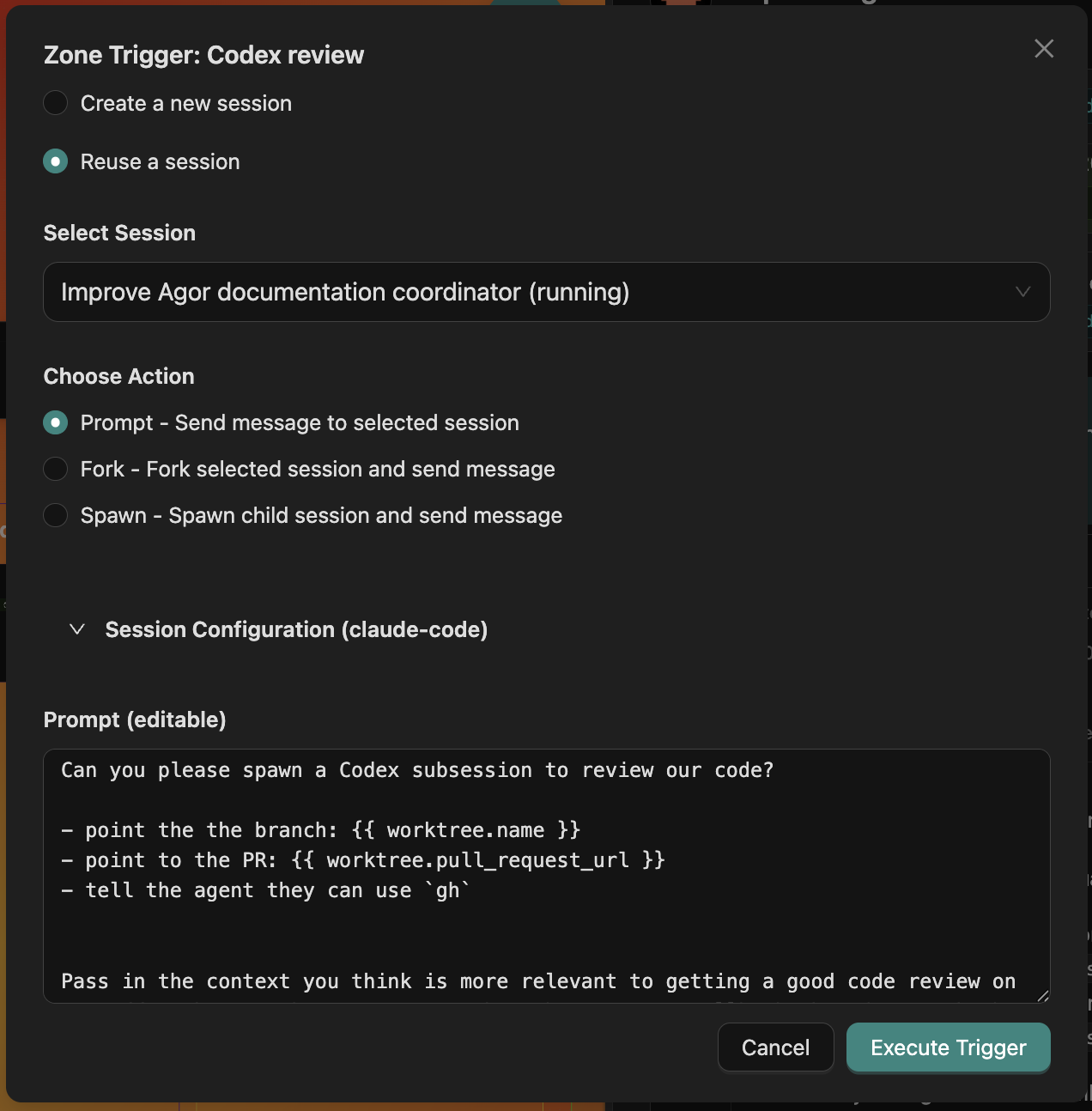
The zone trigger modal, where you pick an action, override session config, and edit the templated prompt before firing.
Kanban-style flows
The classic pattern: chain zones into a pipeline.
[ Triage ]  →  [ Analyze ]  →  [ Build ]  →  [ Review ]  →  [ Ship ]
   issue          plan           code        cross-agent      PR + notes
                                              review
Each zone has a different prompt template. Drag a branch across the board and it walks through the workflow, picking up context at every step.
You can also build asymmetric pipelines: a “Stuck” zone that escalates to a different model, a “Spawn 5 reviewers” zone that fans out to multiple agents, a “Generate tests” zone wired to a Codex template.
Multiple boards, one workspace
A workspace can have many boards, one per team, one per project, one per long-running initiative. Boards are independent canvases with their own branches, zones, and members.
Common patterns:
- Per-project boards: One board per major product, each with its own zones and team.
- Per-pipeline boards: A “PR review” board, a “Bug triage” board, a “Roadmap” board.
- Solo vs team boards: Personal scratch board for experiments, team board for shipped work.
Cards (Beta)
Branches aren’t the only thing that can live on a board. Cards are generic workflow entities (support tickets, sales leads, content pieces) that an teammate creates and manages via MCP. Same spatial canvas, same zones, same multiplayer presence, just not git-bound.
Permissions and branch defaults
Every board has one primary owner and two intentionally separate permission sections. Board and branch RBAC is always enabled:
- Board access controls who can see and manage this canvas.
- Branch defaults define the complete permission package inherited by branches on this board.
Board access uses Viewer, Editor, and Manager roles. Seeing a branch associated with a board does not make the board visible, and seeing a board does not reveal branch cards the person cannot access.
Branch defaults use the same roles, file-access choices, and session-sharing editor as a branch override. A branch inherits the entire package or overrides the entire package—session sharing never has its own separate inheritance switch.
Entries point to one person or group. Direct person entries override group membership; otherwise group entries combine. Others is a clearly labeled fallback for active workspace members who do not match any named entry.
Primary ownership cannot be reassigned. Managers can maintain access and may enable shared prompting for branch-home Sessions, but do not become owners. The workspace preference must also be enabled, and execution-home Sessions are never shareable.
The primary owner can edit the board’s name, emoji, and description independently of named entries and the Others fallback. Other members need Board Editor or Manager access to edit this metadata. Ownership never grants access across workspace tenant boundaries.
Related
- Branches: The primary primitive that lives on boards
- Sessions & Trees: The genealogy rendered on each branch card
- Multiplayer & Social: Cursors, facepile, comments
- Cards: Non-branch entities on boards
- Teammates: AI teammates that orchestrate branches and zones