Knowledge
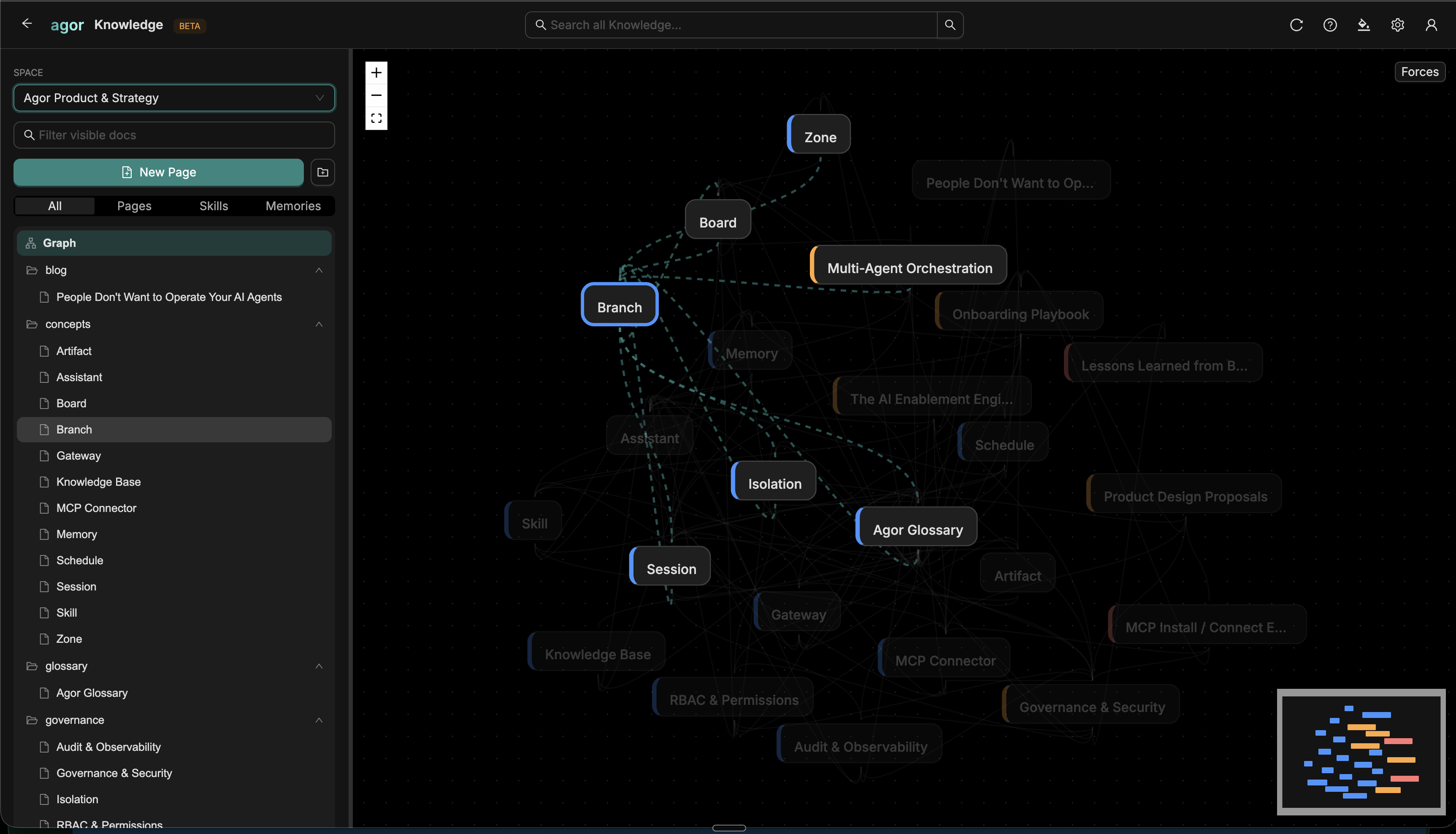
Agor Knowledge is the built-in context layer for your team command center: a central place where humans and agents can store, organize, connect, and find the context that makes work compound over time.
It has everything required to become your team’s main context hub: markdown documents, version history, rich rendering, search, graph links, permissions, and first-class MCP tools for agents. Use it as the source of truth for runbooks, decisions, prompts, teammate memory, and operational knowledge, or as a fast staging area before context moves to another destination. Either way, Knowledge is core to how Agor helps teams and agents accumulate shared understanding.
Context is everywhere: GitHub, Notion, Linear, Slack, repo files, and other knowledge bases. Agor does not ask you to replace all of that on day one. It gives users and agents a durable default place to file the useful bits now, then search, link, reorganize, and reshuffle them later.
Why it matters
A default home for loose context
Agent work produces context constantly: why a branch exists, what a customer said, which deploy caveat matters, how a teammate likes reviews, what a previous agent learned. When there is no obvious repo file or external system for that knowledge, Agor gives everyone a default place to put it.
Shared memory for humans and agents
Knowledge is designed for inter-agent and human/agent collaboration. A human can write a runbook; an agent can search it during a session. One agent can file a decision; another can link to it from a follow-up investigation. Teammates can use it as durable operational memory instead of keeping everything only in branch files or git history.
Zero-config for in-Agor agents
No MCP server setup is required. Knowledge is part of the Agor daemon, and in-Agor sessions already receive the MCP credentials they need. Agents can search, read, write, edit, and publish Knowledge through the same built-in Agor MCP surface they use for branches, sessions, boards, and environments.
What you can store
Knowledge documents are markdown pages grouped into namespaces/spaces. Documents can be tagged by kind (for example doc, memory, skill, prompt, guide, decision, bundle, or external) and can be public or private.
Good fits include:
- Team runbooks: deploy steps, incident notes, review checklists, escalation paths.
- Decisions and rationale: the “why” behind architecture, product, and process choices.
- Reusable prompts and workflows: instructions that agents should reuse instead of rediscovering.
- Teammate memory: durable preferences, project context, operating principles, and daily learnings.
- Scratch-to-structured notes: context filed quickly now and organized more carefully later.
Authoring and rendering
Knowledge uses markdown as the authoring format and Agor’s Streamdown renderer for rich display. That means pages can include the same kinds of content that work well in agent conversations:
- GitHub-flavored markdown and tables
- Syntax-highlighted code blocks with copy controls
- Mermaid diagrams for flows, sequence diagrams, graphs, and architecture sketches
- LaTeX/KaTeX math for technical notes
- Links to other Knowledge documents, including rename-proof
agor://kb/document/<id>references
Each content update creates an immutable version, so the page can evolve without losing history.
Search
Text search is always available. Optional semantic and hybrid search become available when a workspace admin enables embeddings in Knowledge → Settings → Semantic search.
| Mode | Use it for | Requirements |
|---|---|---|
| Text | Exact terms, titles, paths, and normal document lookup | Available by default |
| Semantic | “Find the docs about the thing I mean,” even when terms differ | PostgreSQL + pgvector + configured OpenAI embeddings |
| Hybrid | Blend keyword precision with semantic recall | Same as semantic |
Semantic search is intentionally optional: the Knowledge base still works without it, but embeddings make it much more powerful as the corpus grows.
Semantic-search policy is workspace-scoped. Admins choose the enabled state, OpenAI model, chunking, and indexing settings in the Knowledge UI; the provider API key is stored encrypted and is never returned to the browser. Operators do not configure this policy in config.yaml.
The deployment still supplies the underlying capability. Vector search requires PostgreSQL with pgvector available; SQLite can retain workspace settings and build text-search units, but it cannot perform semantic or hybrid vector search.
Upgrading from YAML-based semantic settings: Before restarting Agor, record any values under
knowledge.semantic_search, then remove the entire top-levelknowledge:block fromconfig.yaml. Agor rejects that removed configuration instead of silently applying one operator policy to every workspace. After startup, a workspace admin can re-enter the policy in Knowledge → Settings → Semantic search. Existing encrypted workspace embedding API keys remain stored and do not need to be copied into YAML.
In required_from_auth deployments, every daemon scans bounded routing metadata across workspaces, then re-enters the selected workspace before reading content, credentials, settings, or vectors. PostgreSQL claims ensure that only one live generation owns a chunk even when several daemons discover it. Distributed scans cap one workspace at 8 chunks per provider batch and 32 candidates per scan; static/single-workspace PostgreSQL preserves the configured 1–128 batch size. SQLite remains text-search-only.
Graph and links
Knowledge is more than a folder of pages. Documents can link to each other, and Agor maintains graph relationships behind those links.
When a Knowledge document contains a resolvable link to another Knowledge document, Agor syncs a references edge in the graph. The Knowledge UI can show a namespace-wide document graph, and MCP tools can fetch neighbors around a document or create explicit graph links.
Use links when you want agents to understand relationships such as:
- A runbook references a decision record.
- A prompt depends on a style guide.
- A memory entry is about a branch, task, or artifact.
- A new investigation supersedes an older note.
For durable cross-document references, prefer the rename-proof document URI that agents receive from search/get results: agor://kb/document/<documentId>.
Agent workflows over MCP
Knowledge has first-class MCP tools, so agents can use it without leaving their session.
Common workflows:
- Browse, search, and load context with
agor_kb_tree,agor_kb_search,agor_kb_get,agor_kb_outline, andagor_kb_get_range. Useagor_kb_tree({ namespace, pathPrefix?, depth? })for the common “show me what is in this namespace” request. It returns a compact folder/document tree with icon, title, kind, path, URI, reference URI, and status only. No document content or version metadata.agor_kb_searchis optimized for query discovery: non-empty searches return metadata plus short snippets by default, while browse/listing calls withquery: ""return metadata only. UsecontentMode: "none" | "snippet" | "full"andsnippetLinesto control result verbosity, and preferagor_kb_getoragor_kb_get_rangewhen you need to read document content. For large markdown docs, useagor_kb_outlineas the map: it returns heading titles, line ranges, compact size hints, duplicate-heading occurrences, andsectionRefselectors such asroot.h1[1].h2[2]. Then callagor_kb_get_rangewith thatsectionRef(or a line range /headingPath+occurrence) to read only the needed section with nearby context. For very large sections, page through the selected section withoffsetLinesandmaxLines. - File new context with
agor_kb_putwhen an agent discovers something worth keeping. - Make targeted edits with
agor_kb_edit, including version checks and dry runs. - Round-trip through a worktree with
agor_kb_materializeandagor_kb_publish_from_worktree, where branch permissions allow local workspace access. - Inspect history with
agor_kb_history. - Connect the graph with
agor_kb_linkandagor_kb_graph_neighbors.
This makes Knowledge a natural companion to Teammates: teammates can still keep file-based identity and memory where that is useful, while using Agor Knowledge as shared, searchable operational memory for the whole workspace.
Permissions and control plane fit
Knowledge is tied into Agor’s existing role-based control plane. Members can create and work with documents and namespaces, workspace admins manage semantic-search settings, and namespace owners/admins manage namespace governance. Each document also carries visibility and edit-policy controls.
In practice, that means Knowledge follows the same posture as the rest of Agor: humans and agents collaborate in one system, with view/edit boundaries enforced by the daemon rather than scattered across ad hoc files and local MCP servers.
When to use Knowledge vs. repo files
Use repo files when the context is part of the product itself: source-adjacent docs, checked-in configuration, prompts that should review with code, or teammate framework files that belong to a branch.
Use Knowledge when the context should be easy for the whole Agor workspace to find, update, link, and reuse across branches, sessions, teammates, and people.
Most teams will use both. The important thing is that useful context has somewhere durable to land.