
Branches
A branch is the primary unit of work in Agor. It’s an isolated git working directory (a checkout of your repo at a specific branch) paired with a metadata record (issue/PR links, owners, environment, sessions) that gives it identity on the board.
Best practice: 1 branch = 1 issue = 1 PR = 1 feature.
Agor uses git branches under the hood, so multiple branches of the same repo can be checked out simultaneously without stashing or switching. Agor manages all of that for you. Just create a branch in the UI or CLI and it handles the git plumbing.
~/.agor/worktrees/<repo>/<name>
├─ feature/oauth2-auth     ← branch checked out here
├─ Sessions: Claude #1, Codex #2 (review fork)
├─ Issue:  github.com/me/repo/issues/123
└─ PR:     github.com/me/repo/pull/456
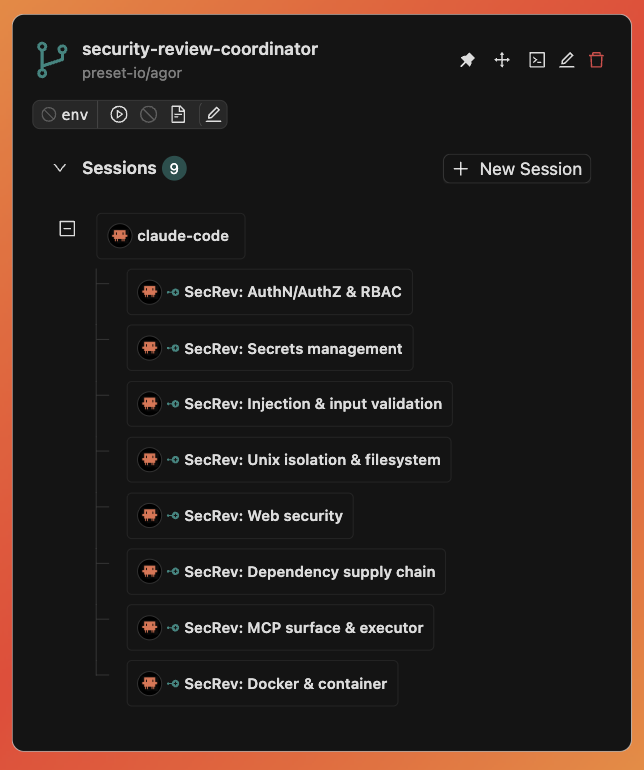
Left: a branch’s static anatomy (branch, PR, env, files, sessions in one tile). Right: the same primitive packed with a coordinator and eight running children.
Why a workspace, not just a git branch
A git branch is a ref. An Agor branch is a workspace.
- Parallel work: Run 5 features in 5 branches simultaneously. No
git stash, no “kill your dev server so I can test mine.” - Spatial identity: Each branch is a card on a board. You can see, drag, group, and zone them.
- Session containers: Every session belongs to exactly one branch. The conversation tree lives on the card.
- Environment scope: Dev servers, ports, and processes are scoped to the branch, not the repo.
Each branch is fully isolated. Changes in one don’t affect another. AI agents can work on three features in parallel without stepping on each other’s filesystem.
Anatomy
A branch is a filesystem directory plus a database record. The record tracks:
| Field | Purpose |
|---|---|
name | Human-readable label shown on the card |
branch | Git branch checked out in the working directory |
issue_url, pull_request_url | GitHub linkage, auto-injected into zone prompts |
| primary owner + permission package | RBAC roles, file access, and session sharing |
board_id + (x, y) | Where the card lives on the canvas |
environment | Per-branch dev environment (start/stop, ports, URL) |

Behind every card: the branch details modal (General / Sessions / Environment / Files / Schedule tabs). The same fields the table above describes, rendered as actual inputs.
Sessions, tasks, comments, and artifacts all reference a branch. The branch is the spine.
Files and Git changes
The branch’s Files tab has three views:
- All files browses the working directory, with combined Git status badges.
- Changes lists unstaged changes, including untracked files and conflicts. Text comparisons use the index as their base.
- Staged changes lists index changes and compares staged text with HEAD, independently of subsequent working-directory edits.
Use Refresh to reload files and statuses. Badges identify added, modified, deleted, renamed, copied, untracked, conflicted, and ignored paths without relying on color alone. Deleted paths remain available in the change views. Text previews offer File and Changes modes; Markdown is rendered in File mode. Downloads are available from All files and contain working-directory bytes, not index bytes.
Git enrichment is best-effort and bounded: if Git is unavailable or exceeds its read budget, ordinary browsing remains available without status badges. Binary or oversized comparisons are not text previews, and complex diffs show a limit notice rather than blocking the browser. Use local Git for complete diffs or unresolved conflicts whose working file is absent. Existing branch filesystem read permissions apply to all three views.
Asynchronous filesystem readiness
Branch creation records the branch and dispatches worktree or clone materialization asynchronously.
The create response can therefore contain filesystem_status: "creating"; REST and UI creation are
not blocked while Git work completes.
MCP callers can set waitForReady: true on agor_branches_create to wait in the creation call, or
use the retry-safe agor_branches_wait_for_ready tool before creating the first session. Waiting is
opt-in, so existing MCP callers—and all REST and UI callers—remain asynchronous. Both paths check
immediately, then perform a fresh tenant- and RBAC-scoped branch read once per second. They wait for
45 seconds by default and accept a bounded waitTimeoutMs from 1 second to 5 minutes. Values longer
than the MCP client’s request deadline require that client or host deadline to be raised as well.
The standalone wait tool is the safer choice when request replay is possible: branch creation is not
idempotent, and losing a waited create response does not cancel the branch that was already created.
Long clones can safely repeat the read-only wait call. A timeout preserves the branch and does not
cancel or retry materialization; terminal failures return the refreshed branch and its persisted safe
error. Every agor_branches_create response after the branch exists includes _create.branch_id.
If a wait cannot finish because a read fails or the request is cancelled, the call still returns the
created branch, with outcome: "unknown" on the interrupted wait (_resolution, or _readiness
when waitForReady is set) instead of a failed create. Client cancellation
only stops further polling. No database transaction or connection is retained between reads; each
individual read remains subject to the daemon’s normal database query timeout.
Source ref resolution
Agor resolves a branch creation’s source ref before either worktree or clone materialization:
- Remote-qualified branches such as
origin/mainorupstream/feature, fullrefs/...names, tags, and commit SHAs are never prefixed or otherwise reinterpreted. - A bare branch name may match a local branch and any number of remote-tracking branches. Agor uses local-first, then lexically sorted remote precedence only when every match points to the same commit.
- If matching refs point to different commits, creation fails with an actionable error listing each candidate and SHA. Qualify the intended ref rather than relying on a remote-name default.
- A missing ref fails instead of being rewritten as
origin/<name>. - An omitted source ref (no MCP
sourceBranch, no CLI--from) means the repository’s default branch on its registered remote URL. Agor resolves the live commit without resetting the registered checkout’s possibly stale local branch, and a retry reuses that recorded remote source. An unavailable remote fails rather than falling back to the local copy; repositories without a remote use their local default. - With clone storage, the registered checkout is only a cache. When its refs disagree about an explicit bare branch name, a new branch starts from that branch on the registered remote instead of failing. Everything else keeps the rules above, and worktree storage keeps the strict check.
Successful agor_branches_create responses include the concrete base_ref, base_sha, and an
explicit _resolution object with the requested ref, resolved ref, and full commit SHA. The MCP call
waits only for this short resolution phase even when waitForReady is false; filesystem
materialization remains asynchronous unless readiness waiting is requested.
Existing remote-branch checkouts stay attached to the local branch at the resolved SHA and track the selected remote, including non-origin remotes. Clone creation also records the normalized remote source so restore can fall back to it if the destination branch has not been pushed and the cache is unavailable. This source record does not authorize managed credentials: those remain bounded to trusted repository/template metadata. Older branches without this source record may still need the original cache to reconstruct a non-origin source.
Storage modes
When you create a branch, Agor can materialize its working directory in two ways:
- Worktree: native
git worktree add, using the repo’s shared.gitmetadata. - Clone: a self-standing
git clonewith its own.git/directory, isolating branch-local git config and credentials from sibling branches.
Operators can choose which modes are available and which one the UI selects by default:
execution:
  branch_storage:
    default_mode: clone
    allowed_modes:
      - clone
    # Optional: reject clone_depth and require complete history.
    allow_shallow_clones: false
    # Optional: stop clone-mode branches from borrowing objects from the
    # daemon's base clone. Usually inferred — see "Borrowed objects" below.
    borrow_base_objects: false
If branch_storage is omitted, Agor keeps the backwards-compatible default: worktree is selected by default and both worktree and clone are available. When an operator restricts allowed_modes, the create-branch UI disables unavailable options and the daemon rejects disallowed API/MCP requests.
allow_shallow_clones defaults to true. Setting it to false rejects any positive
clone_depth; callers must omit the field to create a full clone. This is independent of mount
topology: both full and shallow clones are self-standing, while a native worktree always requires
the registered base repository’s Git metadata.
Borrowed objects (borrow_base_objects)
By default, clone-mode branches are created with git clone --reference against the daemon-managed
base clone at <data_home>/repos/<slug>/. Instead of copying the whole object store, the new branch
gets an alternates pointer into it — per-branch .git/ drops from “full pack copy” to a few MB.
Only immutable objects are shared; .git/config, remotes, and credentials stay branch-local, so the
isolation clone mode buys is preserved.
That pointer is baked in at create time and re-read by every later git command in the branch.
It therefore requires the base clone to be readable from wherever sessions run — not merely from
wherever the branch was materialized. If sessions execute in a different mount (a containerized or
templated executor that only binds the branch workspace and never repos/), git in that branch
breaks as soon as a session touches it:
error: unable to normalize alternate object path: /…/.agor/repos/<org>/<repo>/.git/objects
error: Could not read <sha>
fatal: Failed to traverse parents of commit <sha>
On a freshly created branch that is total: git status, git log, git show and git commit all
exit non-zero on fatal: bad object HEAD before the agent can do anything. A later git fetch or
git pull against a reachable remote can quietly backfill the missing objects and make the branch
look healthy again — but the pointer is still there, still unresolvable, and still erroring on every
command, and anything git could not re-download from the remote stays lost.
Set borrow_base_objects: false on those deployments. Every clone-mode branch then carries its own
complete object store: more disk, no cross-mount dependency.
Agor turns the borrow off by itself in two cases, so most operators never touch the setting:
execution.sandboxis enabled withhome_mode: per_user— which the namedunix_user_mode: sandboxmode forces. The owner-home overlay deliberately hides the entire daemon.agortree —repos/included — and re-exposes only the branch and the managed agentic-tools directory. Branch creation itself is never sandboxed, so without this the daemon would happily write a pointer its own sessions cannot follow.execution.executor_storage.base_repositoryisunavailable— already an operator assertion that executors cannot see the base checkout.
Setting borrow_base_objects: true explicitly overrides the sandbox inference, for operators who
have made the base clone reachable another way (for example
execution.sandbox.extra_allow_write: ['<data_home>/repos'] — note that is a read-write bind,
so a session could rewrite the object store every other borrowed branch depends on).
base_repository: unavailable is not overridable.
Repairing a branch that already has an unresolvable borrow
The setting only affects branches created after the change. An existing branch keeps its pointer.
Do not just delete .git/objects/info/alternates. The borrowed objects were never copied into
the branch, so dropping the pointer strands everything that lived behind it. On a branch with no
in-session commits that is every object (fatal: bad object HEAD). On one that has been worked in,
the session’s own commits survive as local objects but their history does not, so git can no longer
walk them out — git push and git format-patch both die on Could not read <sha> /
fatal: Failed to traverse parents of commit <sha>, and the unpushed work is unrecoverable.
Materialize the objects first, from a context where the base clone is readable (the daemon host,
not a sandboxed session):
cd <data_home>/worktrees/<repo>/<branch>
git repack -a -d          # copies borrowed objects into a local pack — no -l/--local
rm -f .git/objects/info/alternates
git fsck --connectivity-only   # verify before trusting it
Recreating the branch also works, but it allocates a new branch_id and orphans anything bound to
the old one (schedules, gateway channels).
GitHub-native workflow
Because each branch carries issue_url and pull_request_url, AI agents have unambiguous context for what they’re working on. Zones can use that context directly:
deeply analyze this github issue: {{ branch.issue_url }}When the agent runs, it sees the link, fetches the issue, and works against the right branch. No copy-paste, no “which ticket was this for again?”
Environments
Each branch can have its own dev environment, long-running processes (dev server, database, watchers) scoped to that branch, with auto-assigned unique ports so multiple branches can run simultaneously without collisions.
Configure once on the repo, then everyone on your team gets one-click start/stop on every branch.
# Per-repo template, ports derived from branch's unique_id
up_command: 'PORT={{add 9000 branch.unique_id}} pnpm dev'
down_command: "pkill -f 'vite.*{{add 9000 branch.unique_id}}'"
app_url_template: 'http://localhost:{{add 9000 branch.unique_id}}'
→ Environments guide for the full setup.
Archival
When a feature ships and the PR merges, you usually want to clean up disk without losing the conversation history, analytics, or issue/PR linkage.

Workspace here means the branch’s on-disk Git checkout, not your Cloud tenant.
Filesystem options:
- Leave untouched: Metadata-only archival. Files stay on disk.
- Clean workspace: Requires an explicitly enabled repository cleanup policy,
effective branch protection to be off, and Manager authority with writable
workspace access. The configured default is
git clean -fdX(uppercase X: ignored files only). Disabled policy is never a fallback to the old-fdxcommand. - Delete completely: Removes the branch directory from disk.
Metadata options:
- Archive (recommended): Hides from board, preserves all sessions and conversations for analytics and history.
- Delete permanently: Requests irreversible removal of owned branch files and data. Filesystem preservation is not available for permanent deletion; use archive instead.
The dialog checks runtime support separately from branch permissions. Unsupported permanent deletion and external linked-worktree cleanup/removal are disabled with an explanation before confirmation. Permanent deletion is never changed to archive. On an older daemon without capability diagnostics, filesystem-changing choices stay disabled; metadata-only Leave untouched remains available with authority.
When cleanup is unavailable, the archive dialog defaults to Leave untouched and warns that workspace files will remain on disk. It never selects full deletion automatically. A repository administrator can open Repository settings above the archive dialog; saving refreshes the command without submitting archive or overriding an explicit Preserve/Delete choice.
Branch cleanup settings
In Settings → Repositories → Edit, configure Branch cleanup. Cleanup is disabled by default, including for existing repositories. The command can be prepared while disabled. Enabling it is executable-configuration approval and requires repository administrator access; Branch Manager access is not sufficient.
The branch modal’s General tab shows the repository policy and a Protect this branch from cleanup preference. Managers can save protection before repository enablement. If the repository disables Allow branch protection, saved preferences remain stored but are ineffective until allowance is restored. Protection does not prevent full filesystem deletion.
git clean -fdX preserves tracked modifications, staged files, ordinary untracked
files, and stashes. Ignored .env files, datasets, local databases, and ignored
source can still be valuable. There is no undo. Only the exact built-in command
git clean -fdX is currently executable. Custom command settings are preserved,
but execution is blocked until the executor can prove that cleanup-created detached
descendants have stopped. This is separate from best-effort closure of existing
terminals. Never put secrets in saved commands.
Requesting cleanup
Agents can call agor_branches_clean with a branch ID. API clients can call
branches.clean({ branchId }) or POST an empty object to
/branches/:id/clean. The response is accepted, not completed. Read the
branch’s workspace_operation or watch branch updates for its result. The card
and General tab display pending/running/succeeded/failed/unknown state and safe
errors in a compact, dismissible notification; hover for its timestamp. Dismissal
hides the current notification in that view, not the durable operation history.
A new operation or status change shows a fresh notification.
last_cleanup_succeeded_at records command success, not bytes reclaimed.
Stop environments and finish/cancel outstanding tasks before requesting maintenance. Only one maintenance operation can run for a branch at a time; duplicate active requests are rejected, not dispatched again. Built-in cleanup is bounded to five minutes; stdout/stderr are drained without retaining file listings or secrets. Unknown or lost results stay fenced for operator reconciliation and are never automatically retried. After six minutes without a final report, reads display an unknown outcome.
Archive Clean uses the same executor cycle and policy. Archive metadata may already
be saved when a filesystem command fails; filesystem status changes only after
verified success. Preserve and explicit workspace deletion retain conversation data
and SDK homes. Workspace removal does not delete refs in a separate shared repository
or on a remote. However, deleting a clone removes its entire checkout, including
.git: clone-local refs, stashes, and unpushed history can be lost. Push any history
you need to retain before deleting the checkout.
Permanent deletion remains the separate full-resource workflow.
Agor checks known task, upload and environment activity. Terminal closure is best-effort; detached/unmanaged processes are not proven stopped. Delegated/external executors support the fixed cleanup command and explicit checkout removal for self-contained clones, with verified tenant worktrees/repositories mounts. Missing or inconsistent mounts fail closed; an empty executor image directory is not proof of deletion. Legacy linked worktrees remain unsupported on external executors. This requires matching daemon/executor support; the separate delegated permanent-deletion flag does not enable or disable archive cleanup.
Cleanup checks that the checkout is visible before archiving. Executor connectivity,
unsupported responses, and inaccessible storage are errors, not proof that files
are absent. Explicit checkout removal instead verifies its managed storage root
and the checkout’s final absence in the removal worker, so an already-absent checkout
can complete successfully. Leave untouched needs no filesystem executor and never
claims to free disk space.
Branch updated_at is metadata activity, not evidence of filesystem inactivity.
There is no scheduler or age cutoff.
Restoring a workspace
Unarchive admits an executor restore and clears the archive timestamp and actor
atomically. Wait for filesystem_status: ready before starting a session; acceptance
alone is not completion. A failure remains visible with a retryable error.
If the unarchive acknowledgement is lost, the UI stops waiting after 30 seconds and reports an unknown outcome, not failure or readiness. Refresh the page to read the current state; do not assume an active branch’s filesystem is ready. The UI does not automatically replay the request. A late acknowledgement updates the message, but acceptance still is not recovery completion.
An already-active branch left with preserved, cleaned, or deleted status can
use Recover on its card or in the board primary teammate panel,
agor_branches_retry_provisioning, or
POST /branches/:id/retry-provisioning with {}. Recovery requires branch Manager
and filesystem write access and runs as the requesting user. It does not require
archiving the branch again. An in-flight creating attempt or unsettled maintenance
blocks recovery; elapsed time alone never authorizes a replacement executor.
Stop or cancel unfinished tasks, stop the environment, and reconcile pending uploads
before requesting recovery.
Failed recovery continues to block new tasks, uploads, terminals, and environment commands until a subsequent attempt validates readiness. Metadata/bootstrap records are not proof that the workspace is usable.
The executor validates existing Git refs and repository linkage before readiness.
For a missing worktree, a retained local branch is reattached at its exact SHA,
including local-only and unpushed commits. Remote/base reconstruction is used only
when no local branch is retained. This preservation policy is tied to the admitted
filesystem-recovery attempt, not a caller-supplied Git option. Ordinary remote
restore still fast-forwards behind local refs and refuses ahead or diverged refs.
If a local ref appears during reconstruction, recovery refuses to replace it;
retry after inspecting the retained history. Clone recovery requires an actual local .git
directory; symlinks and separate Git directories are not adopted.
Broken or foreign linkage fails without overwriting files. Local teammate homes
are personal directories and need not have Git metadata; missing or empty homes
must be restored from your own backup, never recreated from the public template.
Clean removes ignored files (not necessarily disposable build outputs), not the working directory; Delete removes the
workspace. Neither a historical cleaned status nor an archive timestamp establishes
which action caused a later missing Git target.
User and board primary teammate designations independently block cleanup,
archive, and permanent deletion, regardless of repository cleanup policy. To retire
a teammate intentionally, a branch Manager can choose Retire teammate — keep files
inside Archive or Delete Branch (also available in Teammate settings), or POST /branches/:id/retire-teammate with {}. For an active teammate the Archive dialog uses this explicit, file-preserving
retirement flow, so private personal preferences cannot become a surprise failure
after the dialog closes. Permanent deletion is available after retirement. This atomically
archives the teammate and clears personal primary preferences, preserving all files.
Outstanding tasks, pending uploads, active environments, and maintenance still block
retirement. A board primary must first be cleared or reassigned by that board’s
Editor or Manager. Clear board primary remains available in Archive or Delete Branch;
branch management alone does not grant board authority.
Personal routing preferences are not a permanent veto over branch management, even
when a former collaborator can no longer access the teammate. Users can also choose
Clear primary assistant in their own settings, or call
users.setPrimaryTeammate({ branchId: null, expectedUserId }), without choosing a
replacement. Ordinary cleanup/archive/delete retains primary protection; retirement
is a separate, explicit, file-preserving action. Permanent deletion, if wanted,
remains a later authorized operation.
Recovery rollout and operator preflight
Deploy matching daemon, core, executor and clients together, including pinned delegated launcher images. Drain older provisioning attempts before enabling recovery; an old executor cannot safely acknowledge the new attempt-bound protocol. Do not run mixed versions against recovery work. No schema change is needed, but that is not a readiness or storage preflight.
The new task/upload/terminal admission fence is only for persisted recovery
lineage (provisioning_operation: restore) whenever the filesystem is not ready.
Lineage is sticky: successful recovery does not clear it. If that branch later
becomes nonready (including standalone Clean), producers are fenced again until
Recover validates readiness. It survives failed attempts and subsequent retries.
It does not retroactively fence historical
active cleaned/preserved rows that have never entered recovery. Existing broader
session-creation and environment-command readiness checks still apply; metadata
references are not filesystem readiness. Coordinate a maintenance window with
users before explicitly recovering an active branch: stop tasks and the environment,
settle uploads and maintenance, and stop unmanaged writers. Do not clear private
claim/attempt fields or set ready manually to bypass a fence.
Before rollout, an authorized operator should inventory each tenant separately. For PostgreSQL, use the application’s non-superuser, non-BYPASSRLS role, in a read-only transaction, with a tenant ID obtained from trusted operator context (not an arbitrary request header). This returns counts, not paths or personal data:
BEGIN READ ONLY;
SELECT set_config('agor.tenant_id', '<authorized-tenant-id>', true);
SELECT count(*) AS active_nonready
FROM branches
WHERE tenant_id = current_setting('agor.tenant_id') AND NOT archived
  AND (filesystem_status IN ('creating', 'failed', 'preserved', 'cleaned', 'deleted')
       OR deletion_status IS NOT NULL);
SELECT filesystem_status, deletion_status,
       COALESCE(data->>'provisioning_operation', 'legacy/unset') AS operation,
       storage_mode,
       count(*) AS branches
FROM branches
WHERE tenant_id = current_setting('agor.tenant_id') AND NOT archived
  AND (filesystem_status IN ('creating', 'failed', 'preserved', 'cleaned', 'deleted')
       OR deletion_status IS NOT NULL)
GROUP BY 1, 2, 3, 4 ORDER BY 1, 2, 3, 4;
ROLLBACK;
SQLite is static-tenant only: use a read-only connection to that installation’s
DB, omit the tenant-setting statement and tenant predicates, and use
json_extract(data, '$.provisioning_operation') instead of data->>'provisioning_operation'.
For both databases, inspect the authorized branch detail for each affected row and
record the recovery owner and plan before rollout. A count is not proof files exist.
Archived branches need the same storage review when scheduled for unarchive.
Blockers requiring operator work include unfinished tasks, active environments,
pending uploads, unknown maintenance outcomes, still-owned creating attempts,
missing/empty personal homes, and missing/stale/foreign Git registration. Historical
worktrees are unsupported for restore in hosted multi-tenant mode. Use validated
backups and target-scoped storage repair in the actual executor storage context;
verify ownership, path, ref and registration before retry. Agor does not repair
missing registration for an existing checkout or stale registration for a missing
checkout. Never casually run global git worktree repair or git worktree prune:
Git 2.39 repair can scan siblings and prune registration for homes invisible inside
a sandbox. Take backups and verify sibling visibility with an operator before any
storage repair. Do not reconstruct or remove retained local history.
Recovery deliberately executes as the requesting Manager (with write access), not the branch creator. Command credentials, tenant identity and delegated home key belong to that caller; this is not creator impersonation or a storage ownership transfer. The executor still targets the persisted branch path and validates its identity. A delegated launcher must map authorized Managers to the same persistent branch storage, retain caller-private credentials/homes, and provide suitable filesystem ownership/access. Agor does not chown or copy creator credentials. If the substrate only exposes creator-owned storage, coordinate its access policy before recovery; fail closed rather than silently creating a different caller’s workspace. Verify these requirements against your external substrate before recovery.
Primary protection also remains for standalone Clean. The canonical localHome
marker identifies modern personal homes, but its absence (or a Git repo backing a
teammate) does not prove legacy ignored files are disposable build output. The
current policy cannot safely make that distinction: even git clean -fdX can remove
ignored personal databases and memory. Non-primary repo branches retain normal
policy-controlled Clean;
for a primary teammate, keep it active and use a separately reviewed, target-specific
build-output cleanup rather than retiring it just to reclaim build space. Retirement
never runs Clean and never silently disables or replaces a primary.
Deletion and retained data
Permanent deletion is not account-wide or provider-wide erasure. Shared repositories, user homes, account credentials, boards, and published board-owned artifacts are not exclusively owned by one branch. External provider conversations and remote Git refs are separate resources. Backups and versioned object storage remain subject to their configured retention and locks.
Archive with workspace removal and permanent deletion share the same verified
workspace-removal implementation. The executor uses the daemon’s authoritative
repository location and exact workspace path, not a repository inferred from the
workspace’s .git file. Workspace removal alone does not erase SDK homes or history.
Selecting metadata deletion always requires complete owned-storage removal; preserve
and clean are archive-only choices.
branches.get (also agor_branches_get) returns read-only
maintenance_capabilities for archive_preserve, archive_clean, archive_remove,
and permanent_delete, each with supported and an explanation when unsupported.
These are runtime support hints, not permission grants or proof of mounted
storage, idle work, SDK-home ownership, or a settled prior invocation. Request
admission rechecks all requirements. API/MCP clients should read these before
offering an operation. The public /health response exposes the non-secret
features.permanentBranchDeletion gate for operator diagnostics; a missing field
on an older daemon means unknown, not enabled. Neither diagnostic enables deletion.
The CLI agor branch rm <id> checks runtime support before asking for confirmation; --force explicitly confirms
non-interactive deletion. The former --from-filesystem flag is now redundant.
Deletion is asynchronous. Acceptance is not completion: the branch stays visible
with deletion_status: deleting until required storage removal and database cleanup
have finished. The executor removes the workspace and branch-owned SDK home, asks
the upload storage owner to remove staged bytes, and drains database descendants in
short bounded transactions. Authorization and the branch row are removed last.
There is no database transaction held open while filesystem or object-store work runs.
Stop or cancel unfinished tasks and stop the environment before deleting. Pending upload staging also blocks admission. New managed task/environment work is fenced. Terminal attachments are closed best effort: this does not prove that detached shells or unmanaged external processes have stopped. Stop those processes yourself.
A partial failure leaves deletion_status: deletion_failed and a safe
deletion_error on the branch. Already removed files and committed data batches are
not restored. Retry permanent deletion after correcting a reported, settled failure.
If the executor or a daemon storage request has an unknown outcome, the original
invocation remains fenced: elapsed time is not permission to run another destructive
executor. Operator reconciliation is required; do not clear private maintenance data
to force a retry. An interrupted upload reservation likewise needs reconciliation,
not automatic expiration while its writer could still be active.
Deletion requires available authoritative storage roots. Delegated launchers are
rejected by default; operators may set execution.delegated_branch_deletion: true
only when every deletion executor mounts the tenant’s worktrees, base repositories,
and branch-homes from the same persistent volume. The executor verifies that
these roots are mounted separately from its container filesystem before deleting.
Mount roots must be real directories, not symlink aliases, and the SDK-home target
must be exactly <tenantDataRoot>/branch-homes/<branchId>. Deletion runs with the
requesting Manager’s delegated home key and credentials, not the branch creator’s.
The caller’s shared execution home is not a deletion target.
If deletion reports that it is not enabled for this delegated/external executor, the request was refused before deletion started. This is a deployment capability gate, not a missing branch permission. An operator must first deploy a compatible launcher and executor with the mount contract above, then enable the opt-in through the deployment’s configuration owner. Enabling the flag alone does not provide storage or prove containment. Generic command-template and HA external executors also hit this gate; being able to run prompts or environment commands does not prove that a deletion executor can remove persistent branch storage. Archive is not a substitute for permanent deletion.
Historical SDK sessions using a shared execution home also block deletion until
their owned storage is reconciled; the shared user home is never recursively
removed. Remote Git refs and
shared base-repository Git history are retained. Missing ownership metadata or an
unavailable storage root blocks deletion rather than being treated as successful
erasure. The lazy branch-homes directory may be absent before the first SDK
launch; its tenant data root must still be available. Storage failures log a safe
substep and error category, not raw filesystem paths or credentials.
Repository deletion requires its branches to finish permanent deletion first.
New teammate Knowledge bindings cannot target a branch under deletion, and a
namespace cannot move into or out of that branch while deletion is fenced.
Active branch materialization and taskless .agor.yml exports also block deletion.
An export releases its shared maintenance claim only after its contained executor is
verified stopped; an unknown outcome stays fenced. Deletion heartbeats renew the
short-lived command credential only for the same live invocation and after checking
current branch authority, so a healthy deletion can outlast its initial credential.
The daemon’s existing runtime reconciliation loop observes stale deletion heartbeats; it does not orchestrate the long-running workflow or automatically retry it. A daemon replacement can interrupt individual API requests, and a deployment that also kills executor processes can leave an unknown outcome requiring reconciliation.
Deletion recovery
Use Delete completely again (or agor branch rm <id>) with the same Manager
and writable-files permission required for the original deletion. Acceptance
only starts an asynchronous retry; wait until the branch disappears for completion.
Files and committed database batches removed by earlier attempts are not restored.
- Settled failure: retry starts a new invocation and rechecks required storage before deleting any remaining database rows. If a database-only request timed out or lost its response, the live executor can acknowledge that its storage work stopped. The daemon drains/fences old database requests under the branch transaction lock before permitting retry. This does not assume they rolled back. Only this exact acknowledgement is retried across transient delivery failures: up to 15 seconds, with per-request limits of 2 seconds (including the response body) and backoff from 250 milliseconds to 1 second. Destructive steps are never replayed by this delivery retry. Definitive authority/protocol/ownership rejection stops delivery. A lost committed acknowledgement can already have released the original claim; its replay is rejected, not reported as successful deletion, and cannot release a replacement invocation. There is no claim receipt readback.
- Dispatch never claimed: after it is marked failed, retry atomically replaces the dispatch. A late old executor cannot claim it or begin removal.
- Workspace or SDK-home removal rejected: retry remains blocked. Recursive filesystem removal can reject on one child while sibling removals remain in flight. The executor therefore retains ownership after any rejection from a started removal call, including Git errors and validation inside that call. Successful removal still permits recovery from a later database-only failure; failures during the separate pre-removal validation/quiesce phase can also settle.
- No settlement acknowledgement: retry is blocked and starts no replacement. This includes legacy claimed invocations, a worker killed before acknowledging, lost claim responses, and exhausted settlement delivery. Process exit, a stale heartbeat, or user confirmation cannot supply the missing evidence.
- Upload deletion request has an unknown outcome: retry remains blocked. That request can continue outside the database transaction, including on another daemon. Neither a worker exit nor a database lock proves the storage request stopped. This release does not provide a remote-storage containment/reconciliation mechanism for that condition.
There is no supported online force-unlock for these unsettled conditions without new settlement evidence from the original worker. Do not clear maintenance JSON, change the generation manually, or invoke internal settlement methods. Restarting the daemon does not produce evidence. A legacy incident that already lost its worker is not repaired by upgrading: leave it fenced and escalate for a separately reviewed, topology-specific offline recovery procedure that contains every old executor and daemon/provider storage request. Journal exit records alone are insufficient. Mixed daemon/executor releases are not supported; the new settlement action is deliberately rejected by older daemons rather than silently unlocking.
For diagnostics, correlate [branch.delete] events by branch_id, operation_id,
generation, and invocation_id. Request failures include the action, safe category,
HTTP status when received, elapsed time, and acknowledged page count. Daemon logs
distinguish PostgreSQL serialization/deadlock transaction aborts from unknown errors;
an HTTP 500 or timeout alone never proves rollback. Completed phase summaries report
progress without logging every page. Logs omit tokens, payloads, raw errors, and paths.
Branch-level features
The branch is also where several other features attach:
- Sessions & Trees: Every session lives in exactly one branch. The fork/spawn tree appears on the branch card.
- Boards & Zones: Branches are placed on boards; dropping into zones triggers templated prompts.
- Multiplayer & Social: Spatial comments pin to branches; shared terminal sessions are branch-scoped.
- Scheduler: Templated prompts can fire on a schedule against a specific branch (great for teammate heartbeats).
Permissions (RBAC)
Every branch has one primary owner and a complete permission package. Board and branch RBAC is always enabled, and primary ownership cannot be reassigned.
A branch can inherit its board’s defaults or override the whole package. Choosing an override starts with a copy of the current defaults, so you only need to change the exceptions. To move a branch, choose its destination board and Save. You need branch Manager authority and Editor or Manager access on both boards (workspace administrative bypasses still apply). Inherited branches adopt the destination’s defaults, which can change who can access conversations and files; explicit overrides and primary ownership remain unchanged. Choose an override before moving only if you intend to preserve the current permission package.
| Role | What it allows |
|---|---|
| Viewer | View the branch and its conversations |
| Collaborator | Viewer access plus creating and prompting branch-home Sessions |
| Manager | Collaborator access plus branch, environment, session-lifecycle, and access control |
File access is selected separately as none, read, or read/write. A Collaborator or Manager can open a terminal only with read or read/write file access.
Each access row names one person or group. A direct person entry wins over group memberships. Otherwise group entries combine and the highest file access wins. Others applies only to active members of the workspace who have no direct or group match.
Collaborators and Managers may prompt another person’s branch-home Session only when a workspace admin enables session sharing and the effective branch permission package enables Allow shared session prompting. The prompt is attributed to and executes as the actual caller; only the conversation and branch SDK state are shared. Sessions that use their creator’s execution home—including Sessions created before a branch adopts branch SDK homes—are never shareable. Start a new independent branch-home Session instead.
See Security for deployment modes and the trust boundary discussion.
Related
- Sessions & Trees: Conversations and genealogy that live inside a branch
- Boards & Zones: How branches are organized spatially
- Environments: Per-branch dev environments
- Scheduler: Time-based prompts targeting branches