See the work and shape it together
Live boards for your agent work. Organize it, see what needs you, and follow every session, from the canvas or the threads your team already uses.
Everyone on the same board
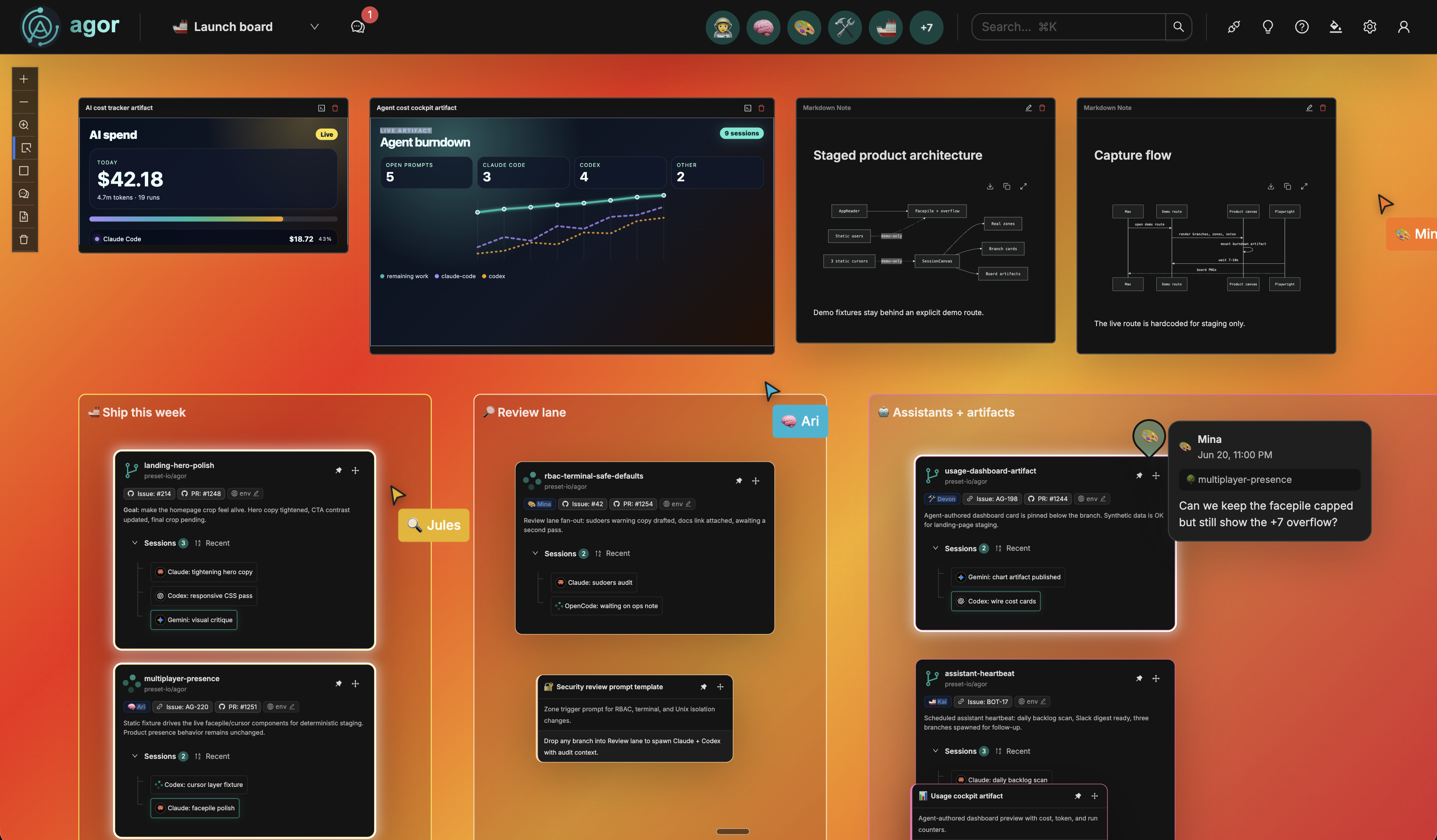
Agent work usually happens in private terminals, so the only way to see it is a screenshot or a status message. On an Agor board, your team and its agents share one live canvas. If you’ve worked in Figma, you already know how this feels.
Live cursors show where each person is working, and the facepile shows who is online. When you see a colleague hovering over a session, you can jump in instead of asking for an update.
- Live cursorsNames and positions update as people move, so you coordinate instead of stepping on each other.
- FacepileSee who is online and click through to the board they are on, when you can see it too.
- Moves everyone seesDrag a branch to a new spot and it moves for everyone watching the board.
Give every piece of work a place
Each branch lives at a spot on a 2D board, with its sessions shown as a tree on the card. People remember where things are: the auth work in the top left, the experiments down below. A board keeps that sense of place instead of flattening it into a list.
Zones mark the stages of your work. Drop a branch into a zone like "Code review" or "Needs tests" and its prompt template runs with the branch, issue, and PR details filled in, so the next step starts where the work already is.
- Boards per team or projectA PR review board, a bug triage board, a roadmap board. Each has its own branches, zones, and members.
- Zones that trigger workChain zones into a pipeline, from triage to review to ship, and drag work through it.
- Cards beyond codeCards put tickets, leads, or content pieces on the same canvas, managed by an AI teammate.
Know which agent needs you
Running many agents creates coordination work of its own. Which session is blocked? Which one finished? The board answers at a glance: a branch card glows when a session is ready for input or a long run has finished.
You don’t have to watch the board to keep up. Favicon status dots and completion chimes tell you when something needs you from another tab.
- Attention glowCards pulse when a session waits for input or a spawned child reports back.
- Status in the tabThe favicon shows whether anything is running or waiting, even when Agor is in the background.
- Cost per promptToken counts and estimated cost show on every message and roll up per session.

Watch the work unfold
Open a session and follow the agent as it works: tool calls, decisions, todo lists, and handoffs, with the full context in one place. Anyone who can see the branch can read along, so reviewing an agent’s approach doesn’t mean asking someone to paste a transcript.
Sessions branch like the work does. Fork one to try an alternative, spawn a child session to hand off a focused task, and see the whole tree on the branch card.
- Structured tool blocksEach tool call renders as its own block, so you can scan what the agent did.
- Queued follow-upsType the next instruction while the agent is still working; it runs as soon as the agent finishes.
- Session treesForks and spawned children stay linked to their parent, and children report back when they finish.
Bring agents into the threads you use
Not everyone needs to live on the canvas. Mention your Agor bot in Slack or Discord, @mention it on a GitHub pull request, or tag it in a Shortcut story, and it starts a session on the right branch and replies in the same thread.
The work still shows up on the board, so people who prefer the canvas can follow along while everyone else stays in the conversation they started.
- Where your team talksSlack, Discord, GitHub, and Shortcut today, with Microsoft Teams coming soon to Agor Cloud.
- Runs as the right personMessages are matched to Agor users, so sessions run under the sender’s identity, and unmatched senders are rejected.
- Configured per channelEach channel sets its own agent, model, permission mode, and MCP servers.
Go deeper in the docs
Explore more of Agor
Bring your team and agents together
Start on your own with Agor Community Edition and bring colleagues in as you go, or talk to us about rolling Agor out across your team. Agor Cloud is here when you’d rather we run it.
Discuss the work where it lives
Agent conversations scroll away. Comments stay put. Pin a threaded comment to a board, a zone, a branch, or a session, right where the question comes up.
Mention a colleague, reply in a thread, and link straight to the session in question. The next person to open that branch finds the discussion next to the work instead of digging through a transcript.
Spatial comments →